Falcontext vs AutoCritYour manuscript in their editor, or checks in yours?
AutoCrit is an online editor for self-editing: you bring your book into it for reports, genre comparisons, story analysis and more. As an AutoCrit alternative, Falcontext does less, on purpose. It stays next to the editor you already write in, tracks your writing days, maps your book and checks your prose. No AI, and your writing is never sent anywhere.
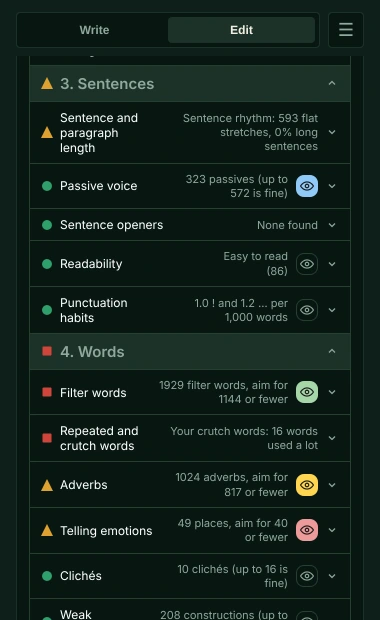
Falcontext vs AutoCrit, side by side
| Falcontext | AutoCrit | |
|---|---|---|
| What it’s for | Counting and checking your book where you already write it, with nothing to import | An online manuscript editing tool for self-editing fiction and non-fiction, with its own editor, the Writer’s Desk |
| Daily words, goals and streaks | Today’s words beside your draft, a daily goal, a streak with one day’s grace, sprints and a finish date, counted as you type | Daily and weekly word count goals, custom goals, a sprint timer and a Pomodoro timer, and writing streaks |
| Prose checks | Checks, each with a traffic light set from published novels: dialogue tags and punctuation, filter words, tense and point-of-view slips, crutch words, clichés, telling emotions, pacing by your own chapters. Many free. See them all | 25+ interactive editing tools: pacing, dialogue and dialogue tags, adverbs, passive indicators, tense and point-of-view consistency, showing and telling, clichés, filler words, repetition and readability, with guidance by genre and a score against published books |
| Spelling and grammar | Homophones, name spelling slips, US and UK spellings mixed and doubled words, but no full grammar check: your editor has one | Yes: a spelling and grammar checker |
| Your book’s structure | Chapters, scenes and characters found in your manuscript as it is, in your own editor; no story analysis or beat sheets | Story Analyzer+ (plot threads, timeline, contradictions, foreshadowing, story beats) and a Series Analyzer |
AI, privacy and price
| Falcontext | AutoCrit | |
|---|---|---|
| AI | None, anywhere. Every check is a rule or a word list | Its editing reports use no generative AI, they say. Generative AI in the optional Inspiration Studio; they also describe the grammar checker, Story Builder and the alpha and beta readers as AI. They say your writing isn’t used to train their AI |
| Where your text goes | It stays on your computer. There’s no Falcontext server to store it | Stored on AutoCrit’s servers in the United States; editing reports need a connection to run |
| Where it works | Beside Google Docs, Atticus, WordPress and Ellipsus in your browser; beside Scrivener, Word, Pages and LibreOffice in the desktop app; and in Perch, the web app, on any device | Its own online editor. Import Word (.docx), .txt or .rtf files, or paste; from Google Docs or Scrivener by exporting a Word file. No browser extension or desktop app listed on its site |
| Account | No account at all | Needed |
| Free plan | No time limit, no sign-up, no word limit: tracking, goals, streaks, sprints, the outline, the character tracker and the free checks | Free Forever: its editor with no word limit, and a few of the editing tools, such as Adverbs and Readability |
| Price | Pro: $1.99 a month or $19.99 a year, with a free trial | Pro $30/month, or $15/month billed yearly |
| Publishing, community and courses | – | ePub and PDF export, marketing copy help (Market Fuel), a private community, and paid courses and critiques |
Everything about AutoCrit here is from AutoCrit’s own pages, read in October 2026: its pricing has the latest. AutoCrit belongs to its makers, and Falcontext isn’t connected to them.
Where AutoCrit is stronger
- A whole-manuscript story analysis: plot threads, timeline contradictions, foreshadowing and beats, across a series too.
- Comparisons with published books by genre, and a score for your manuscript.
- A spelling and grammar check. Falcontext leaves grammar to your editor.
- A complete writing place of its own, with formatting for ePub and print PDF, a community and courses.
- AI tools if you want them: brainstorming, AI alpha and beta readers.
Where this AutoCrit alternative is different
- Your writing is never sent anywhere, and no AI is used on your writing in any way.
- It works in the editor you already use: no importing, no exporting, nothing to copy back.
- Fix changes slips such as dialogue punctuation, quotes and doubled words right in your draft, in Google Docs, Atticus, WordPress, Ellipsus and Perch’s writing pad.
- No account, and nothing to log in to.
- Your whole manuscript, on the free plan too: word tracking, goals, streaks, the outline, the character tracker and the free checks.
- A fraction of the price: Pro is $19.99 a year, where AutoCrit Pro is $15 a month billed yearly.

Which one is for you: AutoCrit, or an alternative?
Honestly? If you want one online place to write, analyse your story by genre, format your book and take courses, with AI tools on hand, AutoCrit is built for that.
If you want to keep writing where you write now, with your manuscript never leaving your computer and no AI anywhere near it, that’s why I built Falcontext. For a fraction of the price.
Not sure? The free plan has no time limit and no sign-up. Try it on your next chapter.
What do you write your books in right now?
Falcontext or AutoCrit? Questions writers ask.
Is Falcontext an AutoCrit alternative?
For some writers. AutoCrit is an online editor you bring your manuscript into, with genre comparisons, story analysis, grammar, AI tools, a community and courses. Falcontext is smaller on purpose: it works next to the editor you already use, with checks written for fiction, word counts, goals and streaks, no AI, and nothing sent anywhere. If you want AutoCrit’s story analysis or courses, Falcontext doesn’t have them.
Does Falcontext use AI like AutoCrit does?
No. AutoCrit says its editing reports don’t use generative AI, but it offers AI in other tools, such as the Inspiration Studio and its alpha and beta readers. Falcontext has no AI at all: every check is a rule or a word list that runs on your own device.
Does Falcontext work with Scrivener and Google Docs?
Yes, directly: the browser extension sits next to your Google Doc, and the desktop app for Mac and Windows reads your Scrivener project, Word or Pages file as you write. There’s nothing to import or export.
More comparisons
Your next chapter starts today.
Set a goal, open your draft and let the checks look over your shoulder.
Add to Chrome – it's freeOr get the desktop app or Perch, the web app.
Free forever plan · No sign-up · Pro from $1.99/month with a free trial