Word count tracker for WordPressWordPress publishes the post. Falcontext polishes it first.
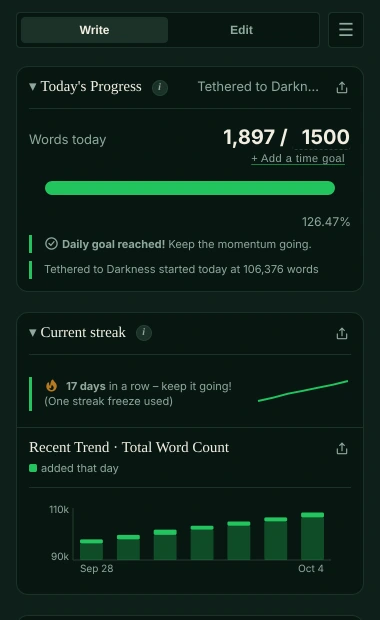
The WordPress word count shows how long a post is. Falcontext sits beside the editor and shows what WordPress doesn’t: today’s words against your goal, the streak you’re on, and the day the book’s done. Plus prose checks, marked right in your post.
Also for Edge, Brave, Arc and Firefox.
Want the full toolset? Try Pro for free →
How to see the WordPress word count.
The block editor counts your words for you; here’s where to find it.
-
Document Overview → Outline
Click Document Overview in the top toolbar (on WordPress.com it’s called List View), then the Outline tab. Or press Shift+Alt+O (⌃+⌥+O on a Mac) to open it.
-
What the WordPress word count shows
Your words and characters, the time to read, how many paragraphs and blocks the post has, and its headings. The count changes as you type.
-
Distraction free, for writing
In the three-dot menu at the top right, choose Distraction free, or press Ctrl+Shift+\ (⇧+⌘+\ on a Mac). The sidebars close and the toolbar fades away.
Useful, but it’s the total of one post. WordPress can’t tell you how much of it is today’s, or how your week went. From WordPress’s own guide, October 2026.
What Falcontext adds to WordPress.
WordPress gives you a word count
- A word and character count per post, with the time to read
- An outline of your headings
- Distraction free, Fullscreen and Spotlight modes for writing
Falcontext adds
- Your day, as well as the post. Every word you add today counts towards a daily goal and your total, and a finish date moves with your pace.
- A streak to keep. Days in a row with words added, plus your best day and best sprint as records.
- Each post, its own count. Every post is tracked on its own, by its title. Like WordPress’s own counter, Falcontext leaves the post title out.
- A category as a book (Pro). Writing a book as posts in one category? Falcontext offers to count every post in it, drafts too, as one manuscript, each post a chapter.
- Your book, mapped. Chapters found from your headings and scene breaks from separators, with words and reading time for each.
- Checks marked in your post. prose checks, the findings marked right in the editor. Click one to jump to it.
- Fix it in WordPress. Curly quotes, a doubled word, a space too many: Fix changes it in the post for you, and Ctrl+Z in WordPress reverses it.
- Focus Mode (Pro). Full screen, with WordPress’s Distraction free turned on and a small badge counting today.
Falcontext reads your post only on the page where you click its icon, and nothing leaves your computer. Your writing is never sent anywhere, and no AI is used on your writing in any way. How your data is handled.
How to track your daily WordPress word count.
A minute, once per post you write in.
-
Install Falcontext
From the Chrome Web Store for Chrome, Edge, Brave and Arc, or from Firefox Add-ons. Free, and there’s no account to make.
Add to Chrome – it's free -
Open your post in the WordPress editor
Write or edit a post on your own WordPress site, in the block editor (your site’s wp-admin).
-
Click the falcon in your toolbar
The panel opens next to the post and the count starts. Reloaded the page? Click it again: Falcontext only reads a page when you ask.
-
Give your WordPress word count a daily goal
Set a goal for the day and one for the whole thing, then write. The numbers follow you as you type.
Good to know.
- Which WordPress: the editor on your own WordPress site, in wp-admin. WordPress.com’s own editor isn’t supported yet.
- Block editor or classic: Falcontext counts in both. Fix and Distraction free need the block editor.
- A new post: words you type before the first save count too. Once you save, the count moves with the post to its own address.
- Changed your mind about a fix? The editor’s own Undo (Ctrl+Z, or ⌘+Z on a Mac) reverses it.
- Writing elsewhere too? See every editor Falcontext works in, from Google Docs to Ellipsus.
Questions about the WordPress word count and Falcontext.
Does WordPress show a word count?
Yes. In the block editor, open Document Overview (List View on WordPress.com) and its Outline tab: it shows the post’s words, characters and time to read. It doesn’t keep track of what you wrote each day; Falcontext does.
Does Falcontext count the post title?
No. Like WordPress’s own counter, it counts the post itself and leaves the title out.
Can Falcontext fix things in my WordPress post?
Yes, in the block editor: Fix and Fix all put a straight quote, a doubled word or a stray space right in your post, and the editor’s own Undo takes a fix back.
Learn more.
Everything here works in WordPress too.
How it works
Checks writers start with
Your next chapter starts today.
Set a goal, open your draft and watch the words add up.
Add to Chrome – it's freeOr get the desktop app or Perch, the web app.
Free forever plan · No sign-up · Pro from $1.99/month with a free trial