Falcontext browser extensionA writing tracker beside your draft.
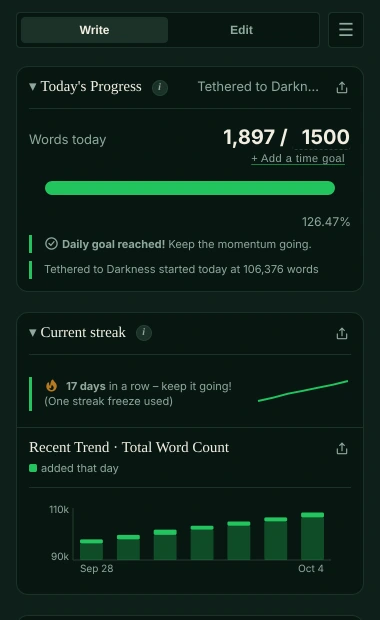
Falcontext’s browser extension opens a sidebar next to what you’re writing in Google Docs, Atticus, WordPress, Ellipsus and other web editors: today’s words against your goal, your streak, your book’s chapters and prose checks.
For Chrome, Edge, Brave and Arc from the Chrome Web Store, and Firefox from Firefox Add-ons. In Safari, use Perch, the web app, or on a Mac the desktop app.
Where the extension works.
Editors with extra support
- Google Docs: counted live through Google’s Docs API, documents with several tabs as one
- Atticus: the whole book as one manuscript, your Atticus goals picked up
- WordPress: counts that match WordPress’s own, in the block editor
- Ellipsus: counts that match Ellipsus’s own counter
- Any other web editor that shows your writing as real text on the page
What it adds
- Today, live. The words you add today against your daily goal and your total, with a finish date that follows your pace.
- A streak, sprints and reminders. One missed day doesn’t break your streak.
- Your book, mapped. Chapters and scenes found for you, and who appears where.
- Prose checks. Marked in your text; Fix and Fix all in Google Docs, Atticus, WordPress and Ellipsus.
- Counted with the panel shut. In Google Docs, Ellipsus and Atticus, turn on “Count without opening Falcontext” and no writing day goes missing.
Falcontext reads your draft in your browser and works everything out there. Your writing is never sent anywhere, and no AI is used on your writing in any way. How your data is handled.
Add it in a minute.
On a computer: the extension doesn’t run on phones, except Firefox on Android.
-
Add Falcontext to your browser
Free, with no Falcontext account: from the Chrome Web Store for Chrome, Edge, Brave and Arc, or from Firefox Add-ons.
Add to Chrome – it's free -
Pin it, then open your draft
Click the puzzle-piece icon at the top right of your browser, then the pin next to Falcontext (in Edge: Show in toolbar). Open what you’re writing and click the falcon.
-
Set your goal
Click the numbers after the slash for a daily goal and a total for the book. Then write: the count moves as you type.
In Google Docs, the first time, Google asks you to sign in and to allow the document in its own file picker: Falcontext can only read the documents you pick there. More in Getting started.
Good to know.
- Scrivener, Word, Pages or LibreOffice Writer? Those are tracked by the desktop app for Mac and Windows.
- On a phone or tablet? Falcontext Perch, the web app, counts your Google Docs there, and has a writing pad of its own.
- Several computers or browsers? Sync keeps your streak and history in step, through Chrome’s own sync or your own Google Drive.
- Pro: paste your license key in the extension’s Settings. One license covers all your own devices. Pricing.
Learn more.
How each feature works, and the checks writers start with.
How it works
Checks writers start with
Your next chapter starts today.
Set a goal, open your draft and watch the words add up.
Open Perch, the web app – it’s freeOr get the browser extension or the desktop app.
Free forever plan · No sign-up · Pro from $1.99/month with a free trial