Word count tracker for Apple PagesPages makes the page. Falcontext maps the book.
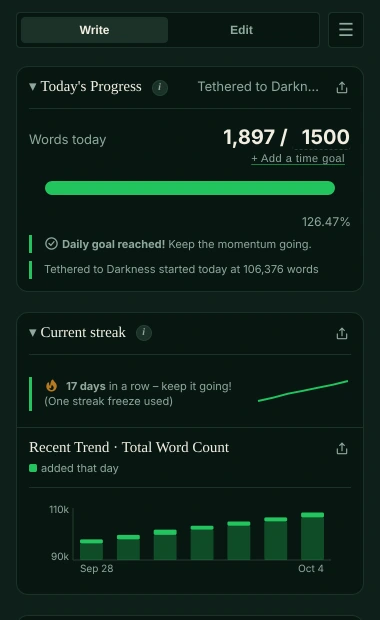
Writing your book on the Mac? Falcontext sits beside Apple Pages and turns its word count into a day count: today’s words, your goal, your streak, and when you’ll finish.
Any Mac from macOS 10.13 on, Apple silicon or Intel. (Pages is Mac-only.)
How to see the word count in Apple Pages.
Pages can show its count while you type:
-
View → Show Word Count in Apple Pages
The count appears at the bottom of the page and stays there while you type.
-
Characters, paragraphs or pages
Click the arrows on the counter to switch what it shows. Highlight a passage to count only that.
A total. What Pages doesn’t keep is yesterday’s number, so it can’t tell you what you wrote today.
What Falcontext adds to Pages.
Apple Pages gives you a word count
- A running total at the bottom of the page (View → Show Word Count)
- Spelling and grammar as you type
Falcontext adds
- Counted while you write. With your document open in Pages, Falcontext checks the count every few seconds and shows what you’ve added today against your goal.
- A finish date. Set the length you’re aiming for and Falcontext works out when you’ll get there at the pace you write.
- A streak that forgives a day. One missed day doesn’t break it. Two in a row do.
- Checks Pages doesn’t do. Pages checks spelling and grammar. Falcontext looks for what fiction gets wrong: filter words, said-bookisms, tense slips, telling instead of showing. Many of them free.
- Your cast, chapter by chapter. See where each character turns up, and who’s been off the page too long.
- Pages and the rest. Drafting in Pages, revising in Word or Google Docs? It’s all one streak and one history, and a book’s files can be one manuscript (Pro).
Falcontext asks Pages for the text to count it, on your Mac, and never edits your document. Your writing is never sent anywhere, and no AI is used on your writing in any way. How your data is handled.
Counting your days in Pages.
Four steps on your Mac, and you’re done.
-
Download Falcontext for the Mac
Free. Updates install themselves.
Download – it’s free -
Add your Pages document
Choose Add…: recent Pages documents appear; or find one yourself, or drop it in.
-
Allow Falcontext to read Pages, once
macOS asks whether Falcontext may control Pages: that’s how it reads your text to count it. Say OK.
-
Set your goals and write
Type your own goals over the numbers beside the slashes. While your document is open in Pages, Falcontext counts it every few seconds.
Good to know.
- Which files: Pages documents (.pages). Falcontext asks Pages for the text, so a document is counted while it’s open in Pages.
- iPhone or iPad too? Falcontext Perch, the web app, runs there; with sync on, your streak and goals match the Mac’s, through your own Google Drive.
- Also on your Mac: Scrivener, Microsoft Word, LibreOffice Writer and Vellum.
Learn more.
Everything here works in Pages too.
How it works
Checks writers start with
Your next chapter starts today.
Set a goal, open your draft and watch the words add up.
Download for MacOr see every editor Falcontext works with.
Free forever plan · No sign-up · Pro from $1.99/month with a free trial