Help › Characters Free
CharactersWhere did she go?
The character tracker finds the names in your manuscript and shows which chapters and scenes each character is in. And who’s been gone too long.
How the character tracker finds names
It looks for capitalised words that keep coming back. Not words capitalised only because they start a sentence (“Then”, “Inside”).
- “Sarah’s” counts as Sarah.
- A title and its name stay together (“Mrs Bennet”, “Uncle Vernon”), and so does a two-word name (“Mary Ann”).
- A name with a man’s and a woman’s title is two people: “Mrs Morel” and “Mr Morel” are listed apart, even when he’s named only a few times.
- Names next to dialogue tags (“Sarah said”) or after a title rank higher.
Who’s been gone too long
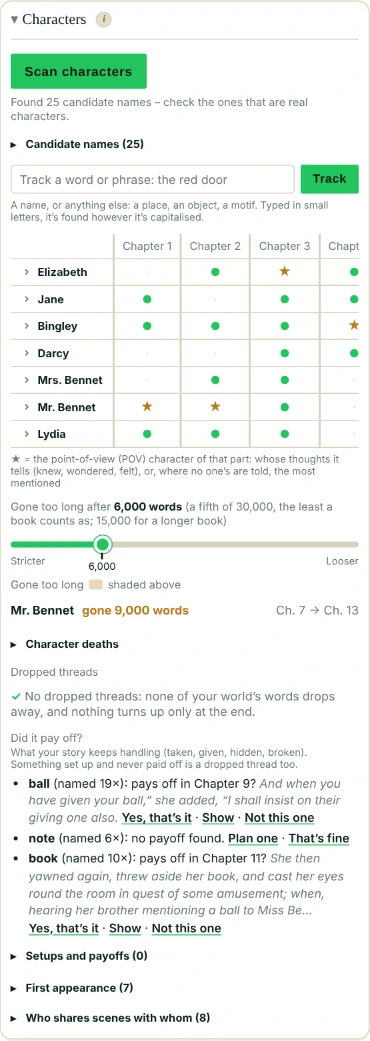
For each character you track, it measures how long they’re off the page, in words, from one mention of their name to the next. Any mention counts, even when someone else talks about them. It flags a gap of more than 15,000 words, or more than a fifth of the book, and shows it in red past 30,000 words or a third. The gap is shaded in the matrix and listed under it, longest first, with where they were last seen and where they come back; Falcontext underlines where they come back.
Where the line comes from: no study says when readers forget a character. Reading research does show that the further back a name was last read, the longer readers take to place it, and that a reminder helps (a detail, a relationship, where we last saw them). So the line comes from published novels: in 27 of them, 3 in 4 main characters are never gone longer than about 17,000 words, and hardly any more than 30,000. Writing a big cast, or several points of view? Move the “Gone too long after” slider, anywhere from 5,000 to 45,000 words. In a book under 75,000 words a fifth of it comes first; the slider shows the line for your book. When no one is gone too long, it says so under the matrix.
Killed someone off? Mark it under Character deaths, and Falcontext stops flagging them. Where your book plainly says a character dies (“Griss was dead.”, “I’m afraid your mother has passed away”), Falcontext offers it there and on their sheet, with the sentence: Set (on the sheet, Yes, set it) marks it, Show takes you to it, Not this one looks further. It never marks a death by itself: someone can seem dead and not be. Not “almost dead” or “if he died”, and “was gone” only when the scene talks about dying around it (last words, a last breath), never when someone asks where they went. After a death, a mention is a memory: it doesn’t count as them coming back.
Not seen again. A gap runs from one mention to the next, so a character who leaves and never comes back has no gap to show. They’re listed under Gone too long as Not seen again: last seen in the book’s first half and never after, with how often they were named and the chapter they were last seen in. Not a character whose death you’ve marked. If they leave on purpose, click That’s fine; the × brings them back. Why the first half: in 27 published novels, 1 of 132 main characters is last seen that early.
Dropped threads
Threads are things, not people: the people are this page’s matrix and Gone too long. Under the matrix, Dropped threads finds them by itself when Bird’s Eye reads the book (Scan now; no character scan needed), so you don’t have to know what you forgot. Two kinds:
- Dropped: a word of your world that comes up and then drops away. Falcontext looks for capitalised words that aren’t names or places (the Hierarchy, the Anointment), mostly said with “the”, named at least three times within a tenth of the book, and then not at all in its last 30%. Titles and peoples (Duke, French) are left out. A word that belongs to one place the story leaves for good (a city’s council, once they’ve left the city and never go back) isn’t listed: that’s the place’s, not a dropped thread. The things you track under the grid (the locket, typed in small letters) and your glossary’s words are checked too: dropped when they’re never named again after the book’s first half.
- Out of nowhere?: named at least three times, but only from the last quarter of the book on. Something that may need setting up earlier.
Each is listed with how often it was named and the chapter it was last seen in; click the chapter to see the mentions there. If it’s meant that way, click That’s fine and it’s not listed again; the × next to it under Said to be fine brings it back.
Why the last quarter: published novels often bring in a major character late, around two-thirds or more of the way (Erik in Main Street, Tanis in Babbitt), so an earlier line would flag books that do it on purpose.
Did it pay off?
A thing your story keeps handling (taken, given, hidden, broken: the necklace, the key) is often set up for something. Under Did it pay off?, Falcontext lists the things your book handles most, and for each the latest moment that looks like its payoff, with the chapter and the sentence: “necklace: pays off in Chapter 27? …breaking the necklace…”. It only reads words, so it asks, as it does for a death:
- Yes, that’s it: it’s listed as paying off there, and not asked again (the × undoes it).
- Show: the sentence in your text.
- Not this one: it asks about the moment before; when there’s none left, it says no payoff found.
No payoff found: Plan one puts it in Setups and payoffs below, ready for you to choose the chapters; That’s fine if it needs none.
Setups and payoffs, in the same place: plan where something is set up and where it pays off (the locket: Chapter 2 → Chapter 28). Falcontext checks that the book names it in both chapters, and says so when it doesn’t, or when it’s first named after the chapter that should set it up.
The same lists are a row in Bird’s Eye: Dropped threads, with how many are dropped and how many things are still to check for a payoff. You can answer there too (That’s fine, Yes, that’s it, Not this one); Show and Plan one are under the matrix.
One sheet per character
Click a tracked name in the matrix to open that character’s sheet, with everything Falcontext knows about them in one place: he, she or they; what they’re also called; their family; their looks; and In the book: where they first come in, how much is from their point of view (POV ★), where they die, and their longest time off the page (before they die, if they do). The first time after a scan, Looks says “Reading the book…” for a moment while Falcontext goes through it.
What the book suggests looks different from what you’ve added: a dashed chip with a question mark (Shen’s mother?). Click it to add it, or click its × to turn it down. To type one yourself, click + add. What you turned down is listed at the bottom of the sheet, under Turned down, with ↺ to bring it back: a slip of the finger on a phone is easily undone.
Family
Who a character is to the others: “Shen’s mother” on Myrthe’s sheet, and “Myrthe’s son” on Shen’s (son or daughter by the he or she you chose, or the book shows; child when it isn’t known). Where the book says it plainly, the sheet suggests it: Shen’s mother? It reads “my” in dialogue as the speaker’s, from the tag (“…” Shen said) or the paragraph’s he or she; a name (“Shen’s mother, Myrthe”); or a his or her it can place (“her husband, Eoden”). Or click + add and type it yourself: Shen’s mother.
Also called
A character the story mostly calls something else (“mother”, “the captain”) can have that added on their sheet, under Also called. Falcontext then counts it as them: in the matrix, when you click a ● or ★, and in the deaths it offers. A word in small letters is found with either capital and with a my, his, her, your or their before it (“Mother”, “his mother”). Where the book links them itself (“My mother is Myrthe Auger”), the sheet suggests it: mother? It’s only added when you click. A title (“Chief of the tides”) is found with “The” in front too, and stops counting after the character dies, since titles pass on; “the new Chief” is never them.
What the book says about their looks
Under Looks: their eyes, hair, build, marks and the rest, one short line each, only as your book says them (“Sarah’s green eyes”, “Sarah had long red hair”). A “her” or “his” (“Her brown eyes were serious”) counts for the only woman or man named just before; when that isn’t clear, it’s left out. Falcontext learns who’s a he or a she from your book; if it reads someone wrong, or they’re a they, choose he, she or they at the top of their sheet: the checks go by your choice. A character the book doesn’t describe gets “No look descriptions found yet.” Each value is a chip: tap it to see the first place the book says it, and again for the next. A feature said two ways (green eyes, then blue) shows both, with an orange mark; the Continuity slips check asks about it too, and links here.
Honest bit
This counts words. It doesn’t understand names. So it will pick up some places and other capitalised words, and miss a character who’s only ever “the captain”. Pick your real characters from the list.
Is the character tracker free?
Free: one character at a time. Pro: more, plus a ★ for the point-of-view (POV) character of each part: whose thoughts it tells (“Sarah knew”, “she wondered”), or, where no one’s are told, the one mentioned most (see Head hopping; click a ● or ★ to see each mention in that part of your text), first-appearance order, who shares scenes with whom, and each character’s sheet of looks.
- Plan
- Free One character at a time. Pro adds more, the POV character of each part, who shares scenes with whom, and character sheets.
Questions about the character tracker.
How does Falcontext find my characters?
It looks for capitalised words that keep coming back, keeps titles and two-word names together, and ranks names next to dialogue tags higher. It’s a word count, not real name recognition, so pick your characters from its list.
Can I stop a dead character being flagged as missing?
Yes. Mark where they die, and Falcontext stops flagging them as gone too long.
Related
Related checks
Your next chapter starts today.
Set a goal, open your draft and let the checks look over your shoulder.
Add to Chrome – it's freeOr get the desktop app or Perch, the web app.
Free forever plan · No sign-up · Pro from $1.99/month with a free trial