Falcontext PerchWrite anywhere. See the whole book.
Falcontext Perch is Falcontext’s web app, a writing tracker in your browser on a phone, a tablet or a computer: a calm writing pad with your goals, streak and prose checks beside it, and your Google Docs counted wherever you write them.
Nothing to install. Add it to your home screen and it opens like an app.
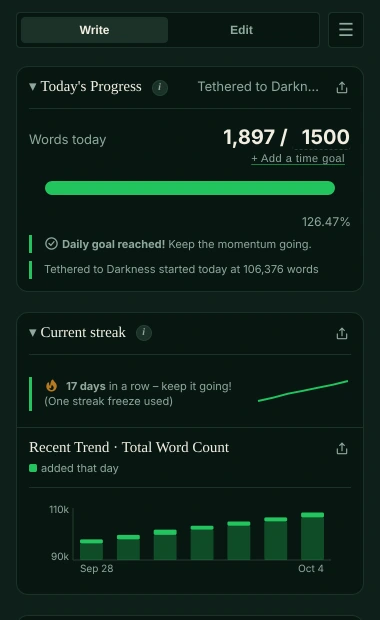
A writing pad and a writing tracker, in one web app.
The writing pad
- A calm full-screen editor: chapters, scenes, scene breaks, italics and bold
- Open a Word file, and download your book as Word, Markdown or plain text
- Saved in your browser after every change, with earlier versions to go back to
- Backed up as a Word file to your own Google Drive, or to a folder on your computer
The writing tracker beside it
- Today’s words and your goals. Words written today against your daily goal, progress towards your total, and a projected finish date.
- A streak that keeps you going. A day counts once you’ve written something; miss one day and your streak survives.
- Your Google Docs, on any device. Write in the Google Docs app on your phone; Perch counts what you added when you open it. Or turn on Write in your Google Docs here in the pad’s Preferences and type in Perch itself: what you type goes into the Google Doc, through Google.
- Chapters and characters. Bird’s Eye lists your chapters and scenes with their word counts, and the character tracker shows who appears where.
- Prose checks, marked in your text. Many checks free, the rest in Pro. On the free plan the Pro ones still show green, orange or red, so you can see where to look. What they find is highlighted right in the pad; checks with a clear fix come with Fix and Fix all.
Your text stays in your browser and, if you choose, your own Google Drive or folder. Your writing is never sent anywhere, and no AI is used on your writing in any way. How your data is handled.
Add it to your home screen.
Then it opens full screen, like any other app.
-
Open falcontext.com/app/
On your phone or tablet, in Safari (iPhone, iPad) or Chrome (Android).
Open Perch -
Add it to your home screen
iPhone and iPad: the Share button, then Add to Home Screen. Android: the ⋮ menu, then Add to Home screen or Install app.
-
Start writing, or add a Google Doc
Write in the pad straight away. To count a Google Doc, sign in with Google and pick the document in Google’s own file picker: Falcontext can only read the documents you pick there.
Good to know.
- On a computer? The browser extension (Chrome, Edge, Brave, Arc and Firefox) tracks Google Docs, Atticus and other web editors live as you type, and the desktop app tracks Scrivener and Word.
- Your progress everywhere: signed in with Google, your streak, history and goals are shared with the extension and the desktop app through your own Google Drive.
- Pro: paste the same license key in Perch’s Settings, as in the extension.
- Counting while closed: a web page can’t run in the background, so words you add to a Google Doc elsewhere are counted the next time you open Perch, and Perch doesn’t send writing reminders.
Learn more.
How each feature works, and the checks writers start with.
How it works
Checks writers start with
Your next chapter starts today.
Set a goal, open your draft and watch the words add up.
Open Perch – it’s freeOr get the browser extension or the desktop app.
Free forever plan · No sign-up · Pro from $1.99/month with a free trial