Help › Goals and progress Free
Goals and progressA number to aim for. Every day.
Word count goals in Falcontext: one for today, one for the whole book. Type your goal, then write. Falcontext adds up your words as you go, no logging by hand.
Setting your word count goals
Both goals sit right in the Write tab. Click the number after Words today in the Today’s Progress card to change your daily goal, and the one after Total words in the Overall Progress card for your book’s goal. They start at 1,000 a day and 80,000 in total; anything from 1 to 10 million works.
Goals belong to the document you’re tracking, so your novel and your short story can each have their own. With manuscripts, a whole book shares one daily goal and one total goal, across all its chapters.
How words today are counted
Words today is your document’s word count now, minus where it stood at the end of the last day Falcontext saw it. So it’s net: cut a paragraph and today’s number goes down with it. It never shows less than zero.
A day runs from midnight to midnight on your own clock. A document you started today counts from zero, even the words you typed before Falcontext first looked.
What the progress cards show
- Today’s Progress: a bar towards your daily goal, the percentage, and how many words are left (and minutes, with a time goal). Reach it and Falcontext says so.
- Overall Progress: your total against your book’s goal.
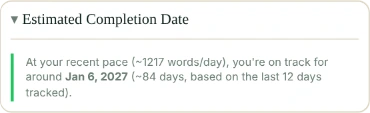
- Estimated Completion Date: at your recent pace, the day you’ll reach your total goal.
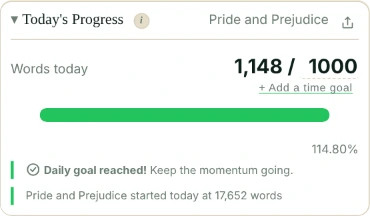
A time goal: words or minutes
Some days the words come slowly. A time goal, in Pro, lets those days count too: your daily goal is met at your words or your minutes, whichever comes first.
Click + Add a time goal under Words today and type the minutes, say 25. A line Time today, typing 0 / 25 min appears; click the 25 to change it, or delete it to have none. One time goal covers all your writing, whatever document you’re in.
The bar follows whichever is further along, and the card says what’s left: “350 words or 15 minutes left to reach your daily goal!”. Reminders stay quiet once either is reached.
What counts as time
- Typing (to start with): a minute counts when you type in it.
- Open: a minute counts while the document is in front, your window is in use, and you’ve typed, clicked or scrolled in it in the last 5 minutes. Rereading and thinking count; a tab left open overnight doesn’t.
- The desktop app can’t see your typing, or whether Word has your document open, so there a minute counts when your document is saved in it.
Click typing on the Time today line to switch to open, and back; it’s in Settings → Daily time goal too. Falcontext counts both all along, so switching shows the other count at once. The minutes are only numbers, kept on your device: never your writing.
To have your streak count only the days you reach your goal, tick Streak: only days I meet my daily goal in Settings. That one is free: on the free plan it goes by your words.
Your estimated finish date
Falcontext takes the words you added over the last two weeks of tracking, works out your average per day, and counts forward to the day you’ll reach your goal.
It waits until there’s a week between the first and last day it tracked, so one big day doesn’t promise you a finished book by Friday. Days you skipped count towards that week. Until then it says which day of the seven you’re on.
- Plan
- Free No sign-up, no time limit. One goal for a whole book across chapters is manuscripts, in Pro.
- Time goal
- Pro New in Falcontext 6.0. A time goal set during Pro is kept if your plan ends, and used again when Pro comes back.
Questions about word count goals.
Does deleting words lower my word count for today?
Yes. Words today is net: your document’s count now minus where it ended the last day Falcontext saw it. It never goes below zero.
When does Falcontext show a finish date?
Once there’s a week between the first and last day it tracked your document, skipped days included. It then uses your average over the last two weeks.
Can my daily goal be time instead of words?
Yes, or both, with Pro. Add a time goal under Words today, and your daily goal is met at your words or your minutes, whichever comes first.
What counts as time spent writing?
Minutes you type in, to start with. Click typing on the Time today line to count every minute the document is in front and in use instead. The desktop app counts the minutes your document is saved in.
Related
Your next chapter starts today.
Set a goal, open your draft and let the checks look over your shoulder.
Add to Chrome – it's freeOr get the desktop app or Perch, the web app.
Free forever plan · No sign-up · Pro from $1.99/month with a free trial