Help › Manuscripts Pro
ManuscriptsTwenty files. One book.
Write one chapter per file? A manuscript adds them up: one goal, one streak and one finish date for the whole book, whichever chapter you’re in.
Making a manuscript
- Open ☰ → All Manuscripts and click + New manuscript.
- Give it a name, a total word count goal and a daily word goal. They start from the document you have open.
- Tick every document that belongs to it, for example one Google Doc per chapter. Use ▲ and ▼ to put them in your book’s order.
- Click Save.
A document can be in one manuscript at a time. A manuscript can mix editors, and documents from your other devices too, once sync is on.
How the words add up
Open any chapter and the Write tab shows the whole book: words today across all its documents, one total against one goal, one streak and one finish date. Move a scene from one chapter to another and it isn’t counted as new writing.
Each manuscript has its own reminders too (up to three), set in the same form.
The All Manuscripts dashboard
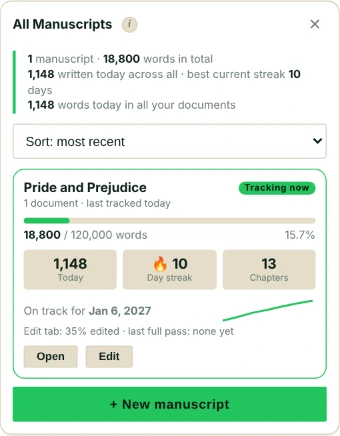
Every manuscript gets a card: its total against its goal, today’s words, its streak, its chapters, when you last worked on it and when you’ll finish at your recent pace. Sort them by most recent, most progress, most words or name.
Atticus and WordPress
In Atticus, a book becomes a manuscript by itself, with Atticus’s own target and daily goal. In WordPress, Falcontext offers to count every post in a category as one manuscript, drafts included.
Deleting one
Edit → Delete manuscript. Its documents keep all their tracked data; they just stop appearing together.
- Plan
- Pro Part of Pro ($1.99/month or $19.99/year, with a free trial).
Questions about manuscripts.
Can one document be in two manuscripts?
No. Each document belongs to one manuscript at a time, so its words are never counted twice.
What happens to my chapters if I delete a manuscript?
Nothing. Each document keeps its own goals, history and streak; only the grouping goes.
Related
Your next chapter starts today.
Set a goal, open your draft and let the checks look over your shoulder.
Add to Chrome – it's freeOr get the desktop app or Perch, the web app.
Free forever plan · No sign-up · Pro from $1.99/month with a free trial