Self-editing guide · prose checksSelf-edit your novel, one pass at a time.
How to self-edit your novel the way editors do: big to small, in five passes. For each pass, what to do, what to look for and how to fix it, with what editors and writers advise, and Falcontext’s prose checks doing the finding.
On a phone or tablet? Paste a chapter into the writing pad in Falcontext Perch, the web app, or send yourself the link and add the extension to your computer in one click.
Before you self-edit your novel
This is how editors work, start to finish. Rather edit as you go, or in your own order? That works too: edit your way.
When you self-edit a novel, go from big to small. That’s how professional editors work: first the developmental edit, which deals with “content, organization, and genre considerations”, then the line edit, sentence by sentence, then the copyedit, and proofreading last, as “the final quality check before publication”. Renni Browne’s editing firm sees no sense in “doing any line-level editing before your book is as sound as you can make in content, pacing, and structure.” No point polishing a sentence in a scene you’re about to cut.
Falcontext splits those stages into five passes, a little finer (the five are our own split, not an editors’ standard):
Structure is the developmental edit: the big picture.
Scenes and dialogue is a bit of both: point of view and continuity are big picture, dialogue tags are details.
Sentences and words are the line edit.
Proofing is the copyedit and the proofread, together and last.
1 Structure
Developmental edit
2 Scenes and dialogue
A bit of both
3 Sentences4 Words
Line edit
5 Proofing
Copyedit and proofread
Finish the draft first, and let it rest. Stephen King puts a finished draft away for “a minimum of six weeks” before he reads it again, and aims for a second draft shorter than the first: “2nd Draft = 1st Draft – 10%.”
How each pass works in Falcontext
Open your manuscript with Falcontext beside it, and go to the Edit tab. The checks run by themselves: in Google Docs, Atticus, WordPress, Ellipsus and other web editors, in Scrivener, Word, Pages and LibreOffice Writer with the desktop app, and in the writing pad in Perch, the web app.
Pick a pass, and what it checks: one scene, its chapter or the whole book.
Click a finding to see it marked in your own text. Fix it, or, if you meant it, Ignore it, just there or everywhere. The light updates.
The Edit tab: the five passes, ticked scene by scene, and how much of the book is edited.
On the free plan, the free checks show you everything they find. The rest still show green, orange or red, so you can see where there’s something to look at; Pro shows what they found.
Edit your way
Big to small is how editors work through a finished draft. It isn’t the only way to self-edit a novel, and Falcontext doesn’t make you follow it.
As you go. While you write, the Write tab catches slips in today’s words (doubled words, paragraphs pasted twice, unfinished sentences, stray spaces), and shows them again when a sprint ends or you reach your daily goal. On the Edit tab, passes 2 to 5 can check only today’s writing, or your changes since last time: polish yesterday’s chapter before you start today’s.
In any order. Pick any pass, any time, on one scene, a chapter or the whole book. Or run Full pass: every check at once, on the whole book.
One check at a time. Know your weak spot? Show them on a check lists its findings across the whole book, so you can work through just that one.
The ticks keep track of what’s done, whatever order you do it in, so even if you work out of order, you still go through every step an editor would: Edited shows how far each pass has got, and Next up points you to what’s still to do. And a ticked scene that changes a lot gets a ✎, so you know to look at it again.
Start with the shape of the book. Is every chapter pulling its weight, in the right place, at the right length? Changes here move whole scenes, so make them before anything else.
Want to hold your book up against a well-known plot structure? Story structures explains seven of them, and where the turns of each one fall.
Look at each chapter’s length against your target, and under Characters at who’s been gone too long.
Run pass 1 on the whole book. It goes chapter by chapter.
Rewrite, move or cut what isn’t working, then tick the chapter.
Pass 1 in the panel: characters gone too long, and each chapter’s sentence length and dialogue.
Chapters that stand out
No style guide gives a number for how much one chapter may differ from the next, so Falcontext compares each chapter’s sentence length and dialogue with the rest of your own book. Standing out on purpose is fine: the fight, the escape, the quiet chapter after. A chapter in the middle that crawls without you meaning it to is the one to look at.
Chapters that open by waking up, with the weather or in front of a mirror: the openings agents and editors say they see most. Needs Bird’s Eye’s chapters.
Now go scene by scene: who’s telling it, and how the characters talk. Browne and King’s Self-Editing for Fiction Writers gives this three chapters of its twelve: Point of View, Dialogue Mechanics and Easy Beats.
Pick pass 2. Next up shows the first scene still to do.
Start with tense and point of view, then the dialogue.
Fix or ignore each finding. The scene’s box fills as you go, and ticks itself once its lights are green.
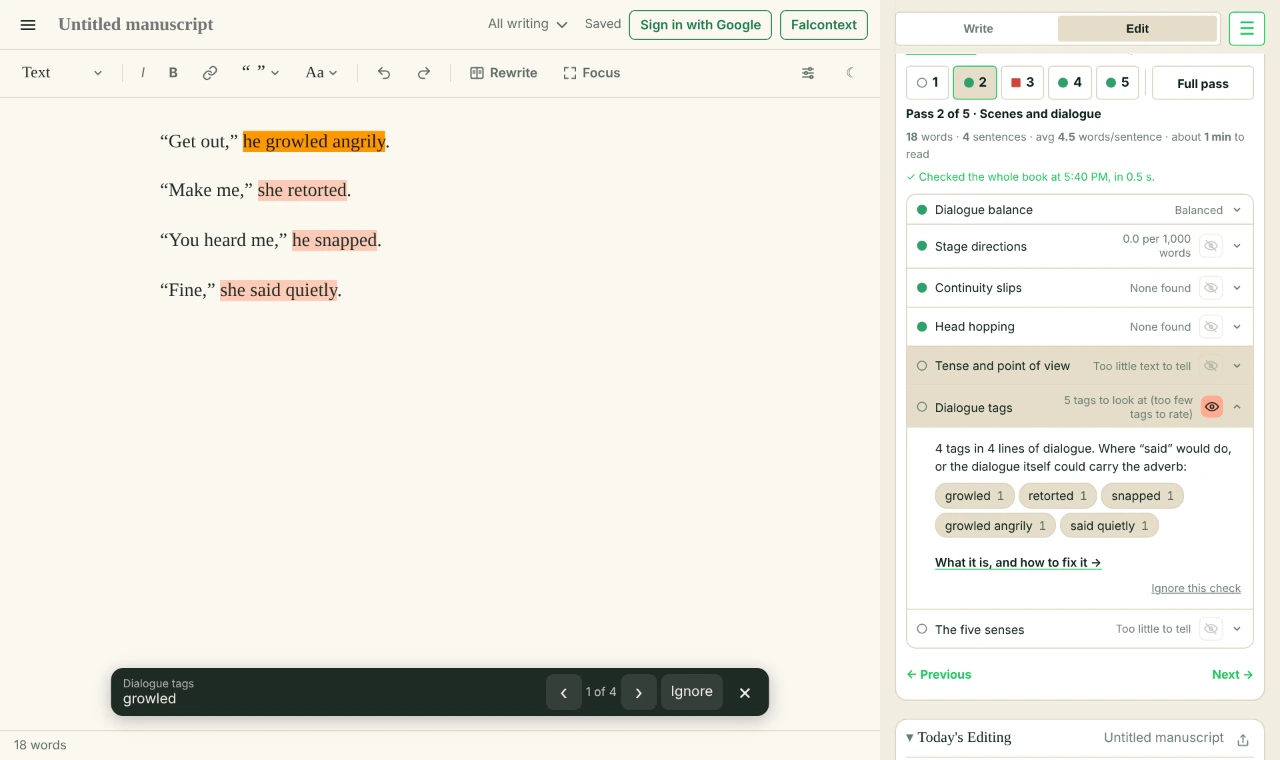
Dialogue tags: every tag fancier than “said”, marked in the text.
Slips in tense or point of view
A paragraph in the present tense in a past-tense book, or an “I” in a third-person one, is a slip a spell checker won’t see. Put it back in your book’s way, or ignore it if the change is on purpose.
Before“Get out,” he growled angrily. “Make me,” she retorted.
After“Get out.” He didn’t look up from the fire. “Make me,” she said.
Speeches that run on
Break them with a beat (someone moves, looks away, pours a drink), a reaction from whoever’s listening, or a question that changes direction. Unless the speech is the scene: a confession, a story within the story. Then let it run.
How much dialogue?
There’s no right share. Mark Liberman measured about half of The Great Gatsby in quotation marks and 3% of To the Lighthouse. So Falcontext only flags the far ends.
Slips in what happens
Someone stands up when they were already standing, or their eyes are green in chapter 2 and blue in chapter 19. Fixing that can mean rewriting part of a scene, so catch it here, before you polish the scene’s sentences. A change you meant, like dyed hair, you can ignore.
More than what they see
A scene told only through what the character sees can feel thin. A sound, a smell, something to touch puts the reader in the room. Falcontext shows how much of each sense a scene draws on.
A scene told from inside one character (“Anna knew”, “her heart sank”) that slips into another’s thoughts (“Mark wondered”). One head per scene, or a scene break.
Speeches of over 250 words without a break, added up across paragraphs (a speech tag alone isn’t a break). A beat, a reaction or a question from someone else keeps the scene alive.
Nods, shrugs, sighs, smiles, glances: body language that fills the space between lines. A few help; many start to feel like stage directions. It skips dialogue.
Someone who gets up while already standing or sits while already sitting; or eyes, hair, height or writing hand that change (“Sarah’s eyes: green in ch. 2, blue in ch. 19”). Narration only; dyed or cut hair is a change, not a slip.
How much your writing draws on sight, sound, smell, touch and taste. Books that lean only on sight feel thin. It skips dialogue.
No checks of that kind in this pass.
3
Sentences
With the scenes in place, the line edit starts: how each sentence reads, and how they sound together. This is where reading aloud earns its keep. Browne and King suggest you “try reading the passage aloud, listening carefully for any little changes you’re inclined to make while reading.” Or let your computer read it to you: “You will catch typos, repetition, draggy passages, and confusion.”
Pick pass 3: scene by scene, or only today’s changes if you’re revising as you go.
Read each flagged stretch aloud before you touch it.
Fix what sounds wrong. Ignore what you meant.
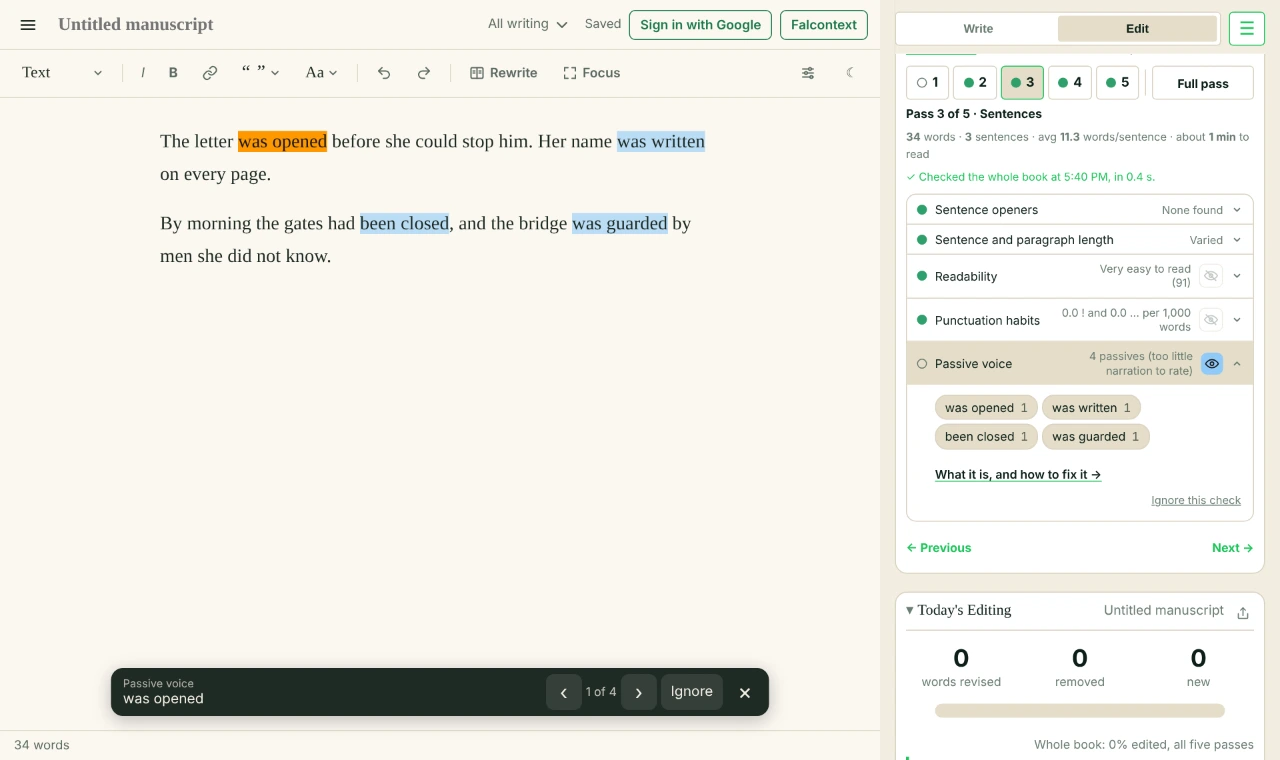
Passive voice: each one marked, with the bar at the bottom to step through them, or ignore one.
Passive voice that hides who’s acting
Orwell’s rule was “Never use the passive where you can use the active”, but novels don’t follow it to the letter: the middle of the 38 published books I measured had 5.5 per 1,000 words. It’s right when the doer is unknown or the point (“The body was found at dawn”), or when a character is dodging blame (“Mistakes were made”). Otherwise, name who does it.
BeforeThe letter was opened before she could stop him.
AfterHe tore the letter open before she could stop him.
Sentences that drone
Gary Provost’s famous lesson starts “This sentence has five words” and ends with the music of varied lengths. Where four sentences in a row run the same length, join two, or cut one in half. A sentence of 35 words or more is worth a second read.
“-ing” openers
Strunk’s rule: “A participial phrase at the beginning of a sentence must refer to the grammatical subject.” And the -ing says “at the same time”: turning while opening a door behind you can’t happen at once. Make it two actions.
Walls of text
Break a long paragraph where the focus shifts, where time jumps, or before the line you want to land hardest.
Readability
Fiction scores “in the range 70 < Score < 90” on Flesch’s reading ease, Flesch found. The middle of my 38 books scored 76.4. Only a very low score is worth a look.
The subject receives the action (“the door was opened”). Active is usually livelier (“she opened the door”). How someone is (“she was tired”) isn’t counted, nor is dialogue.
Sentence openersPro
How sentences start: the same word again and again, or an -ing word that makes two actions happen at once.
Repetitive openers Three or more sentences in a row opening with the same word.
“-ing” openers “Turning, she opened the door”: an -ing word and a comma. It skips dialogue.
Exclamation marks, ellipses and dashes in the narration, per 1,000 words. Every writer leans on one of them; in dialogue they’re the character’s voice, so they aren’t counted.
No checks of that kind in this pass.
4
Words
Now the words themselves, and the ones you lean on. In each check, the words you use most come first, with their counts, and every one is marked in your text.
Pick pass 4, and work down the page.
Change the ones that weaken the sentence.
Keep the ones you love: ignore them, there or everywhere.
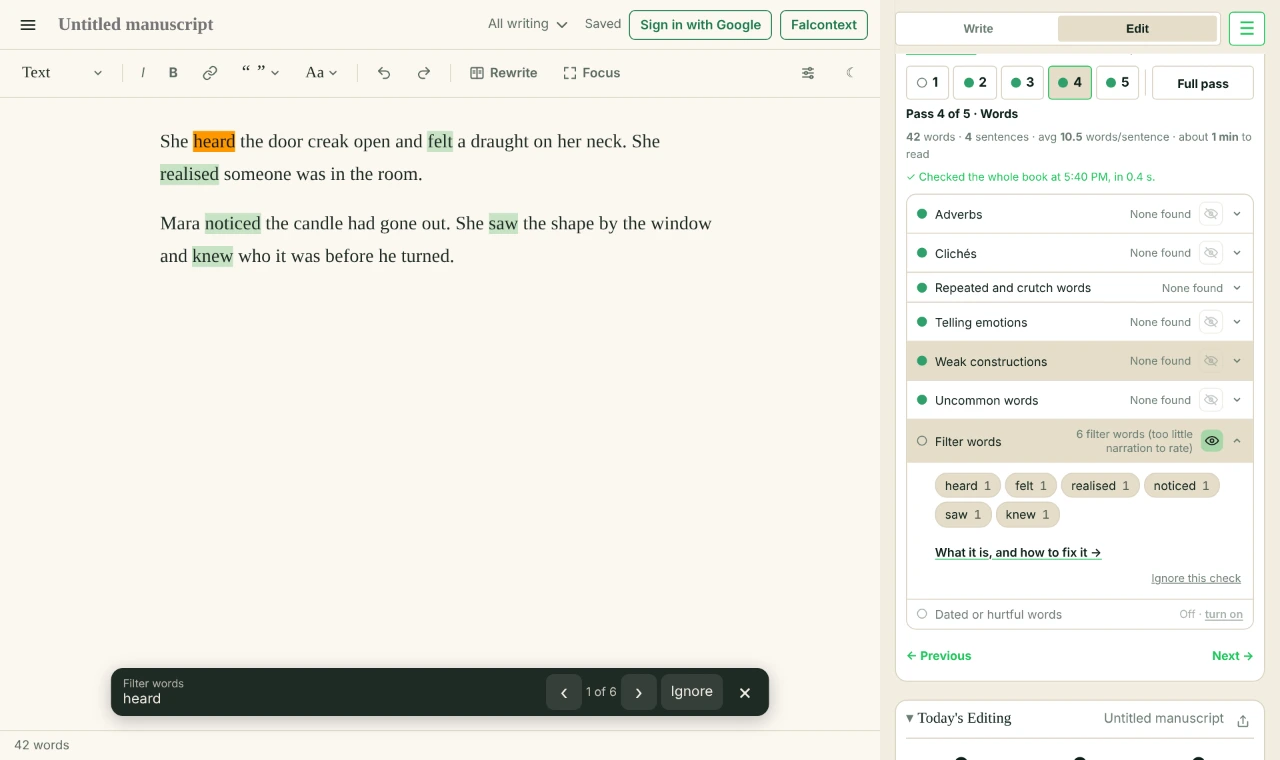
Filter words: the ones you use most first, every one marked in your text.
John Gardner wanted “she noticed” and “she saw” “suppressed in favor of direct presentation of the thing seen”. Cut the filter and keep what’s seen, or put the feeling in the body (“He felt cold” → “His fingers wouldn’t close”). A character who realises something too late still needs that “realised”.
BeforeShe heard the door creak open and felt a draught on her neck.
AfterThe door creaked open. A draught touched her neck.
Telling emotions
“In scenes, events are seen as they happen rather than described after the fact,” write Browne and King. “She was angry” is after the fact: show it in what she does. A quick “she was tired” is fine where the moment doesn’t matter.
Everyone has them. Mine is “even”: 256 times in one book. Falcontext shows the words you use at least twice as often as published fiction, and the synonym checker finds another word.
Words ending in -ly, outside dialogue. Filler ones (simply, actually, really) can often just go; with the others a stronger verb often does the job alone (“walked slowly” → “crept”). It skips time words like “recently” and “finally”.
Words like felt, saw, knew, that put the narrator between the reader and the scene. Cutting them puts the reader in it. It skips dialogue: there, “I saw him” is just how people talk.
The same word twice within a few sentences, outside dialogue, forms included (looked … looking). Sometimes deliberate, often not. Names, “said” and “asked” aren’t counted, nor the 500 most used words in fiction (look, eyes, door).
Words you lean on: at least twice as often as in English fiction published 2000–2019 (Google Books Ngram Viewer). A word’s forms count together (look, looked, looking). It skips dialogue.
Sentence shapes that pad or delay the action: “there was a knock” where “someone knocked” would do, and “began to run” where “ran” would. Passive voice is different: that’s about who does the action, not how the sentence is built.
Long words (7 letters or more) outside the 20,000 most used in English fiction (Google Books, 2000–2019), which a reader may trip over. A rare word can be just right; many can slow the reading. It skips names and dialogue.
Words that may read as dated or hurtful (“wheelchair-bound”, “authoress”), each with what’s used now. Off until you turn it on: novels use such words on purpose, in a character’s voice or a period. It skips dialogue. From alex’s list (retext-equality).
No checks of that kind in this pass.
5
Proofing
Last: the copyedit and the proofread. Start this pass only when you’ve stopped rewriting, or you’ll be proofreading twice.
Turn on Final draft, above the checks: every light gets a quarter stricter, for polishing.
Run pass 5 on the whole book.
Use Fix for one finding, or Fix all for every one like it, in Google Docs, Atticus, WordPress, Ellipsus and Perch’s writing pad. In the desktop app, Falcontext finds them and you fix them yourself.
Read the homophones one by one: those aren’t in Fix all, because each needs your eyes.
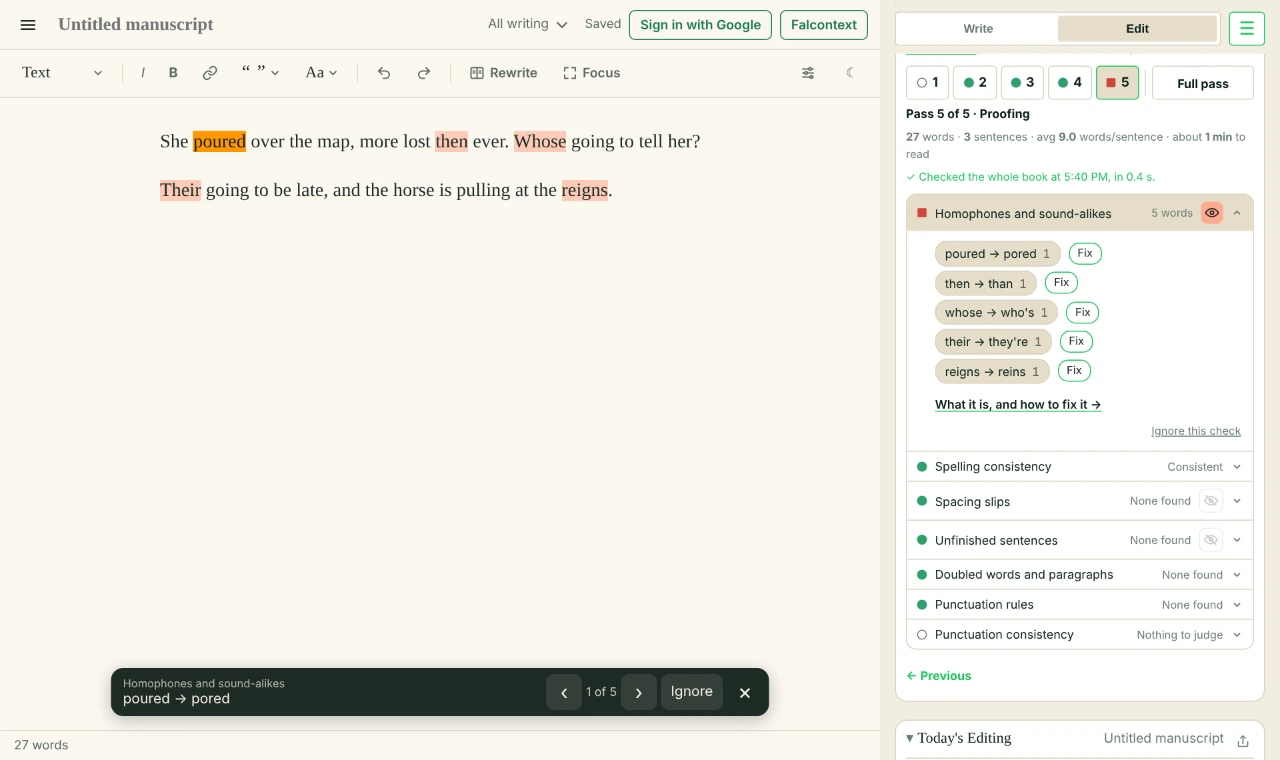
Homophones: each one marked in your text, to fix one by one.
One way, all the way
Copyeditors keep a style sheet so the book makes every choice the same way throughout. In the words of Chicago’s editors: “If it’s 11:00 a.m. in chapter 1, it shouldn’t be 2 PM in chapter 3. That’s what style sheets are for.” Falcontext keeps that sheet for you: spelling, names, quotation marks, dashes and ellipses each go the way your book mostly goes. Which way is up to you: Chicago closes up its em dashes where British style spaces en dashes, Chicago spaces its ellipses where AP shoves them together, and for spelling, Chicago editors “pick the first-listed term” in Merriam-Webster.
Dialogue punctuation
A tag follows? End the line with a comma, inside the quotation marks, and start the tag small: “Hello,” she said. That’s Chicago style. A question or exclamation keeps its mark, with no comma. An action isn’t a tag, so it gets a full stop: “Hello.” She smiled. In Google Docs, Atticus, WordPress, Ellipsus and the writing pad, Fix puts them right for you.
Typos a spell checker can’t see
“Their going” and “poured over the map” are spelled right. In my proofreading test of 40 sentences with 28 such mistakes, Google Docs caught 19, Word 21 and Falcontext 23. So when the checks are done, read it once more yourself.
BeforeShe poured over the map, more lost then ever. Whose going to tell her?
AfterShe pored over the map, more lost than ever. Who’s going to tell her?
The checks in this pass
Spelling consistencyPro
Words spelled the other way from the rest of the book. Either way is fine; mixing them isn’t.
US or UK spelling US against UK (color, colour), or -ize against -ise (realize, realise).
Words written two ways Email and e-mail, all right and alright, okay and OK: it keeps the way the book uses most.
Two spaces between words, a space before a comma or full stop (“word ,”), or none after one (“word,word”). It leaves times, decimals, web addresses and abbreviations alone.
A paragraph with no full stop at the end, a line break mid-sentence, a small letter starting a sentence, or a quotation mark or bracket never closed. It leaves headings, abbreviations and the paragraph you’re writing alone.
Doubled words and paragraphsFree
What was left in twice by accident, from one word to a whole paragraph.
Doubled words and marks A word typed twice (“the the”) and doubled marks (“,,” “,.”). Words people do say twice (had had) aren’t counted.
Duplicate paragraphs The same paragraph (8 words or more) twice in the book: pasted twice, or left behind after a move.
A real word where its sound-alike was meant: whose and who’s, pour and pore over, then and than. In dialogue “would of” is left alone (a way of speaking). 100,000 rules, from published fiction (Google Books).
The Chicago Manual of Style’s punctuation, used by most US publishers: commas and full stops inside the closing quote, and numbers up to a hundred in words. How you set dashes is up to you (Punctuation consistency checks they match).
A full stop where a tag follows (“Hello.” she said), no comma (“Hello” she said), the comma outside the quote, a capital after the comma, or a comma before an action: “Hello,” she smiled → “Hello.” She smiled.
No checks of that kind in this pass.
The self-editing checklist
Everything you need to self-edit a novel, on one list. Big to small, and proofing last.
Before you start
Finish the draft, and let it rest before you read it again.
Check that Bird’s Eye found your chapters and scenes.
1. Structure
Each chapter’s length, against the others and your target.
Characters who’ve been gone too long.
Chapters that open with waking up, the weather or a mirror.
Chapters whose pace stands out, and whether you meant it.
2. Scenes and dialogue
Paragraphs that slip out of your book’s tense or point of view.
Tags fancier than “said”, and adverbs on tags.
Long speeches with no break, and nods, shrugs and sighs filling the gaps.
Continuity: someone who stands up twice, eyes that change colour.
Scenes that lean only on sight.
3. Sentences
Read the flagged stretches aloud.
Passive voice that hides who’s acting.
Runs of sentences the same length, and the very long ones.
Sentences opening on an -ing word and a comma.
4. Words
Adverbs a stronger verb could replace.
Filter words: felt, saw, heard, knew, realised.
Feelings named instead of shown.
Clichés, “there was” and “began to”, and your own crutch words.
5. Proofing
Final draft on.
One spelling, one kind of quotation mark, dash and ellipsis throughout.
Dialogue punctuation: a comma before the tag, a full stop before an action.
After each writing session: go through today’s slips on the Write tab. Click one to see it in your text, then fix it or ignore it.
Before you start writing: run passes 2 to 4 on your changes since last time.
When the draft is done: pass 1 on the whole book, then pass 5 with Final draft on.
Check Edited: at 100%, every pass is done on every scene, so nothing an editor would do was skipped.
Sources
Where every quote comes from. The numbers for published books are my own count across 38 published texts, and Google Books’ English Fiction 2000–2019: how the traffic lights are set.