Where Falcontext worksWorks where you write.
In your browser beside your draft, and in the desktop app beside Scrivener, Word, Pages, LibreOffice and Vellum.
On a phone or tablet? Falcontext Perch, the web app, works in any browser.
Want the full toolset? Try Pro for free →
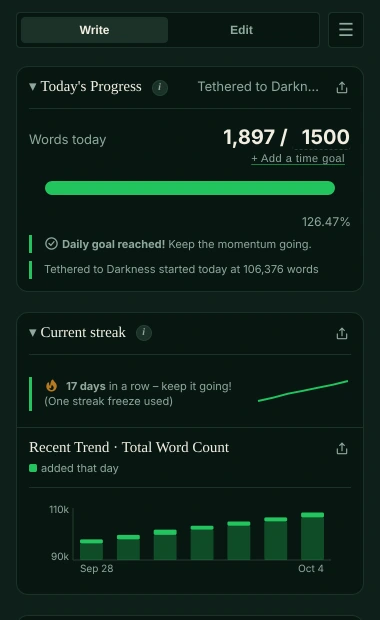
Some editors get extra support, and any web editor with real text on the page is tracked. In every one of them, the same promise: Your writing is never sent anywhere, and no AI is used on your writing in any way.
Google Docs Deep integration
Counted live, through Google’s Docs API, documents with several tabs counted as one, and Falcontext’s own focus mode. It opens only the documents you pick for it, in Google’s picker. More about Google Docs →
Atticus Deep integration
The whole book counted as one manuscript, your Atticus goals picked up automatically, chapter titles read from the book, and a focus mode that clears Atticus’s toolbars too. More about Atticus →
WordPress Fine-tuned
In the block editor, counts match WordPress’s own word counter, and Focus mode switches on WordPress’s built-in “Distraction free” view. More about WordPress →
Ellipsus Fine-tuned
Counts match Ellipsus’s own counter, and Focus mode uses Ellipsus’s built-in Focus mode. More about Ellipsus →
Any other web editor Works
If your editor runs in your browser and shows your writing as real text on the page, Falcontext tracks it from what’s on screen: word counts, goals, streaks and records.
Scrivener, Word and Pages Desktop app
The Falcontext desktop app for Mac and Windows tracks Scrivener projects and Microsoft Word documents (and, on the Mac, Apple Pages), with the same goals, streaks and checks, and syncs your progress with the extension through your Google Drive. Scrivener → · Word → · Pages → · Download →
LibreOffice Writer Desktop app
The desktop app tracks LibreOffice Writer documents (.odt) like Word documents: counted every time you save, with your headings as chapters in Bird’s Eye. LibreOffice’s web version (Collabora Online, in Nextcloud and elsewhere) draws the page as an image, so the extension can’t read it there; Nextcloud’s own Text editor works like any other web editor. More about LibreOffice Writer →
Vellum Desktop app
On the Mac, the desktop app reads a Vellum book each time Vellum saves and counts only the story: the prologue, chapters and epilogue, not the front and back matter. Chapter titles are chapters in Bird’s Eye and ornamental breaks are scene breaks. Findings are fixed by hand in Vellum. More about Vellum →
Where Falcontext works: good to know
- Falcontext runs on a computer in Google Chrome, Microsoft Edge, Brave or Arc, all from the Chrome Web Store, and in Firefox, on a computer or an Android phone, from Firefox Add-ons. In Safari, use Perch, the web app, or on a Mac the desktop app.
- Outside Chrome, Google Docs tracking asks you to sign in with Google once. Your progress follows you between browsers and the desktop app through your Google Drive, once sync is turned on in Settings.
- Your editor not here, or a count that looks off? Email support@falcontext.com.
One tracker, whichever editor.
The same word count tracking in every one of them: your goal for today and for the book, your streak and your history, kept together when you switch.
And the checks
Also using ProWritingAid? It edits a finished draft; Falcontext keeps you writing and checks your prose while you draft. How the two fit together →
Your next chapter starts today.
Set a goal, open your draft and watch the words add up.
Add to Chrome – it's freeOr get the desktop app or Perch, the web app.
Free forever plan · No sign-up · Pro from $1.99/month with a free trial