Falcontext vs GrammarlyA grammar checker, or a novelist’s companion?
Grammarly checks your grammar everywhere you type, and it’s an AI writing assistant. As a Grammarly alternative, Falcontext is the opposite in a few ways: made for novels, no AI, and your writing is never sent anywhere. It tracks your writing days, maps your book and checks what fiction gets wrong, right next to your draft.
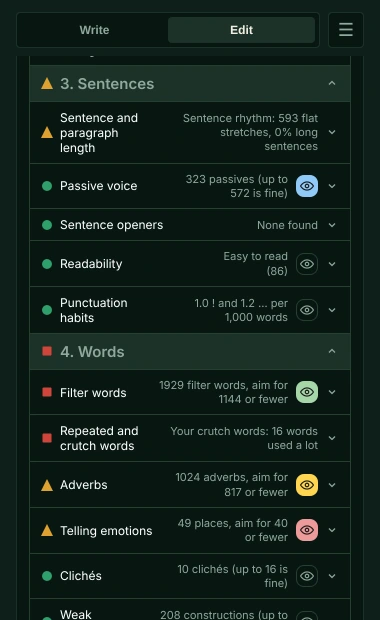
Falcontext vs Grammarly, side by side
| Falcontext | Grammarly | |
|---|---|---|
| What it’s for | One job: helping you finish a novel, with daily counts and fiction checks beside your draft | An AI writing assistant for every kind of writing: grammar, clarity, tone and AI rewrites (now part of Superhuman) |
| Daily words, goals and streaks | Words today against a daily goal, a streak, sprints, a finish date and personal records | Weekly writing stats by email; no word count goals or streaks listed |
| Prose checks | Rule-based checks made for fiction, each with a traffic light: tense and POV slips, dialogue tags and punctuation, filter words, telling emotions, crutch words, pacing. Many of them are free. The full list | Clarity, tone and style suggestions. A “Creative” setting in the paid plans gives grammar rules some leeway; no checks written for fiction (dialogue tags, filter words, point of view) listed |
| Spelling and grammar | Not a grammar checker. It catches what slips past one: homophones, a character’s name spelled two ways, doubled words, US and UK spelling mixed | Yes: grammar, spelling and punctuation, on the free plan too |
| Your book’s structure | Your chapters and scenes mapped, with their lengths and your characters in each | – |
AI, privacy and price
| Falcontext | Grammarly | |
|---|---|---|
| AI | Zero. Nothing generates, rewrites or learns from your text | Generative AI throughout: rewrites, tone, AI agents and prompts. For personal accounts, using your content to improve and train its products is on by default; you can turn it off |
| Where your text goes | It never leaves your device, so there’s nothing to train on and nothing to opt out of | Sent to Grammarly’s cloud to be checked; it needs an internet connection |
| Where it works | Google Docs, Atticus, WordPress and Ellipsus in Chrome, Edge, Brave, Arc and Firefox; Scrivener, Word, Pages and LibreOffice in the desktop app; Perch, the web app, on phones and tablets | A browser extension (Chrome, Safari, Firefox, Edge), Google Docs through it, desktop apps for Mac and Windows (Word, Scrivener and many more), and a phone keyboard. Atticus isn’t listed |
| Account | None | Needed (free sign-up) |
| Free plan | Free for good, no sign-up: all the tracking, the outline, characters and the free checks | Spelling and grammar, tone, and 100 AI prompts a month |
| Price | Pro $19.99 a year or $1.99 a month, with a free trial | Pro $30/month, or $144/year ($12/month), with a 7-day free trial |
The Grammarly column comes from Grammarly’s site and help pages as they stood in October 2026 (current plans). Grammarly is a trademark of its owner, with no link to Falcontext.
In a proofreading test
I gave nine tools the same 40 sentences of fiction, with 28 mistakes: words that sound like the right one, and words typed twice (7 October 2026). Grammarly caught 27, with no false alarms. Falcontext caught 23, also with no false alarms, and with no AI at all, on your own device. The full test, and how I ran it.
Where Grammarly is stronger
- A full grammar and spelling check, free. Falcontext leaves grammar to your editor.
- It works almost everywhere: email, chat, documents, and your phone’s keyboard.
- Tone detection, AI rewrites and plagiarism checks, for any kind of writing.
Where this Grammarly alternative is different
- Your writing is never sent anywhere, and no AI is used on your writing in any way.
- Your manuscript never trains anything, and there’s nothing to opt out of.
- Checks written for fiction: tense and point-of-view slips, dialogue tags and dialogue punctuation, filter words, telling emotions, clichés, crutch words, pacing per chapter.
- It keeps you writing: today’s words, a daily goal, a streak, sprints and a finish date.
- It sees the whole book: chapters, scenes and characters found for you.
- No account, and a fraction of the price: Pro is $19.99 a year, where Grammarly Pro is $144.

Which one is for you: Grammarly, or an alternative?
If you want grammar and spelling checked everywhere you type, with AI to rewrite and adjust tone, Grammarly is built for that.
If you’re writing a novel and want your words counted and your prose checked for what fiction gets wrong, with your manuscript on your own computer and no AI anywhere near it, that’s why I built Falcontext.
They do different jobs, so you can use both: Grammarly for grammar, Falcontext in the sidebar for your daily count, streak and fiction checks.
Do you use AI when you write, or do you keep it far away from your book?
Falcontext or Grammarly? Questions writers ask.
Is Falcontext a Grammarly alternative for fiction writers?
It does a different job. Grammarly checks grammar and spelling and offers AI rewrites for any kind of writing. Falcontext doesn’t check grammar; it checks what fiction gets wrong (tense slips, dialogue tags and punctuation, filter words, telling emotions, homophones) and tracks your daily words and streak. Your editor’s own grammar check can do that part alongside it.
Does Grammarly use my writing to train AI?
Grammarly says that for personal accounts, using your content to improve and train its products is on by default, and that you can turn it off in your settings. Falcontext has no AI and never sees your writing: Your writing is never sent anywhere, and no AI is used on your writing in any way.
Can I use Falcontext and Grammarly together?
Yes. They do different jobs: Grammarly for grammar, Falcontext in its side panel for your daily count, streak and fiction checks.
More comparisons
Your next chapter starts today.
Set a goal, open your draft and let the checks look over your shoulder.
Add to Chrome – it's freeOr get the desktop app or Perch, the web app.
Free forever plan · No sign-up · Pro from $1.99/month with a free trial