Falcontext for Mac and WindowsYour desktop editor, with a falcon’s eye.
The Falcontext desktop app is a word count tracker for Mac and Windows. It tracks your Scrivener projects and your Microsoft Word, LibreOffice Writer and (on the Mac) Apple Pages documents and Vellum books: the same goals, streaks, history and checks as in your browser, in a window beside your draft.
For Macs with Apple silicon or Intel, macOS 10.13 or later, and for Windows 10 and 11 (64-bit). Pro unlocks with the license key you already have.
On Windows? Falcontext for Windows is on the way, for Word, Scrivener and LibreOffice: email me when it’s out.
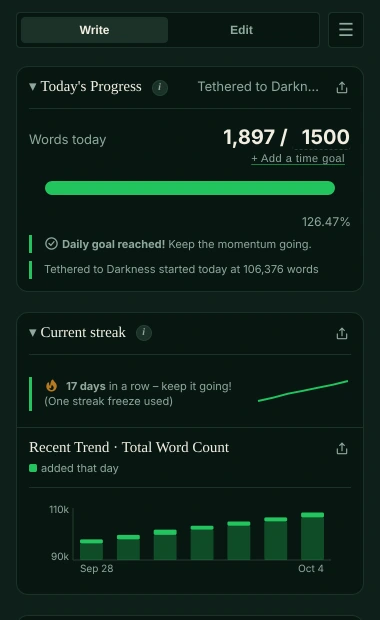
Getting started with the word count tracker on a Mac
- Open Falcontext.dmg and drag Falcontext to Applications.
- Open Falcontext. It lives in the Dock and in the menu bar; closing the window keeps it tracking.
- Choose Add…: Falcontext suggests your recent Scrivener projects, Word, Pages and LibreOffice documents and Vellum books, or drop one on the window. It offers new ones you create by itself.
- Write. Falcontext counts Scrivener, Word, LibreOffice and Vellum every time they save, and Pages while the document is open.
Getting started with the word count tracker on Windows
- If nothing seems to download, your browser may be holding the file back (Edge says it “isn’t commonly downloaded”): press Ctrl+J for the list of downloads, choose … next to Falcontext-Setup, then Keep (and Keep anyway if it asks again). In Chrome, choose Download or Keep next to it there.
- Open Falcontext-Setup (the file you downloaded). If Windows says “Windows protected your PC”, choose More info → Run anyway: the app is new to Windows’ list of known apps.
- Falcontext opens by itself, and lives by the clock at the bottom right (in the ^ menu, if Windows tucks it away); closing the window keeps it tracking.
- Choose Add…: Falcontext suggests your recent Scrivener projects and Word and LibreOffice documents, or drop one on the window. It offers new ones you create by itself. To add a Scrivener project, pick its .scrivx file.
- Write. Falcontext counts Scrivener, Word and LibreOffice every time they save.
Your progress, everywhere
Turn on Settings → Sync → Sync with Falcontext in my browser in the app, and Also sync through my Google Drive in the extension, signed in with the same Google account. Your streak, history, goals and manuscripts then follow you between Chrome and the desktop app. They’re kept in a hidden folder in your own Google Drive that only Falcontext can see – no Falcontext server is involved, and your manuscript’s text is never synced. Privacy policy →
Permissions macOS asks for
- Pages: Falcontext asks Pages for your document’s text to count it, so macOS asks once whether Falcontext may control Pages.
- Focus Mode: switching Scrivener, Word, Pages, LibreOffice or Vellum into a distraction-free view needs Falcontext allowed under System Settings → Privacy & Security → Accessibility. Falcontext shows you where.
- Notifications: for writing reminders and the end of a sprint.
Updates
Falcontext keeps itself up to date: it downloads a new version in the background, and a Restart button appears when it’s ready.
More about tracking Scrivener, Word, Pages, LibreOffice Writer and Vellum with Falcontext.
Questions, or something not counted right? Tell me at support@falcontext.com.