Help › Sprints Free
Sprint ModeSet a timer. Write. Don’t stop.
Sprint Mode times your writing sprints: a countdown for your word count. Pick how long, start it, and Falcontext counts the words you add before time runs out.
How writing sprints work
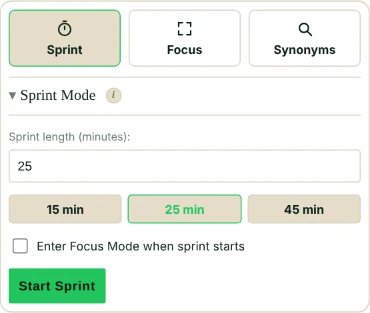
Open the Write tab and click Sprint. Pick a length in minutes: anything from 1 to 180, with 15, 25 and 45 one click away. Start.
Then write. Falcontext counts how many words you add to the document you’re tracking, live, until the timer runs out.
That’s it. No logging, no typing in numbers afterwards.
While it runs, the Sprint button shows the time left. Close the panel and the sprint keeps going: if it ends while the panel is closed, it’s scored by the count when time ran out. Switch documents halfway, and Falcontext keeps the words from the first one.
It counts how much your word count grew, never less than nothing. So words you delete during a sprint come off the words you add.
Stop Sprint ends it early and tells you what you wrote. In the desktop app, a notification tells you when time’s up.
Writing sprints and Focus Mode
A sprint works with or without Focus Mode. With Pro, a sprint can start Focus Mode for you (tick Enter Focus Mode when sprint starts), so it’s just you and the page until the timer’s done.
What a sprint counts towards
- Your best sprint ever, across all your documents, is one of your personal records. It goes by words, so a sprint you stopped early counts too.
- Sprints earn badges too: those count only the sprints that ran to the end.
- Sprint on two devices? With sync on, they add up.
- Plan
- Free No sign-up, no time limit.
- Works in
- the browser extension (Chrome, Edge, Brave, Arc and Firefox), Perch (the web app) and the desktop app for Mac and Windows. In Perch, a sprint in its writing pad counts as you type; a sprint in a Google Doc is scored when you open Perch again.
Questions about writing sprints.
What is a writing sprint?
A set stretch of time, often 15 to 30 minutes, where you only write: no editing, no checking your phone. Falcontext’s Sprint Mode times it and counts the words you add.
Does Sprint Mode work in Google Docs?
Yes. Start the sprint in the panel next to your Google Doc and write: the words you add are counted until the timer ends. It works in Scrivener, Word and the other editors Falcontext tracks too.
Related
Your next chapter starts today.
Set a goal, open your draft and let the checks look over your shoulder.
Add to Chrome – it's freeOr get the desktop app or Perch, the web app.
Free forever plan · No sign-up · Pro from $1.99/month with a free trial