Help › Sync Free
SyncEvery device, in step.
Write on your laptop, check your streak on your phone. Sync your writing progress, and your goals, history, streaks, records, manuscripts, badges and settings stay the same everywhere.
Two ways to sync your writing progress
- Chrome to Chrome: Chrome browsers signed in to the same Google account share them through Chrome’s own sync.
- Everything else, through your Google Drive: the desktop app, Perch (the web app) and your other browsers. It’s a file in Drive’s hidden app folder, which only Falcontext can see. Nobody at Falcontext can.
Chrome sync is on by default. Drive is off until you turn it on. The desktop app and Perch only have Drive.
What’s synced, and what isn’t
Your numbers, settings, and the names of your documents, manuscripts and chapters. Through Drive, also your scene ticks, the few words of any finding you chose to ignore, and short codes for your paragraphs (codes, not words), so the Write tab knows what changed today on another computer.
Never your manuscript’s text. Never your license key: only its last four characters, so Settings can list your devices. Theme and layout stay on each device.
Sync uses no Falcontext server. It’s your own Google Drive, which you allow. So the promise stands: Your writing is never sent anywhere, and no AI is used on your writing in any way.
Sync your writing progress: turning it on
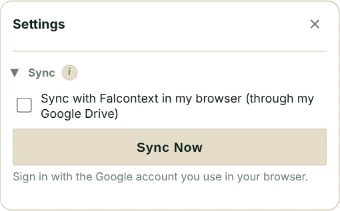
In the extension: Settings → Sync → Also sync through my Google Drive. In the desktop app: Settings → Sync → Sync with Falcontext in my browser. Sign in with the same Google account in both.
Google’s consent page has a separate tick box that lets Falcontext see its own data in your Drive. Tick it, or sync can’t work.
How often, and who wins
Chrome sync sends changes at most every 30 seconds. Drive saves at most every 2 minutes, and looks for other devices’ changes every 5. Sync Now does it straight away.
When two devices disagree, Falcontext throws nothing away. Each past day keeps the higher count, records keep the highest, and for goals and settings the latest change wins. A device whose clock runs ahead can’t overrule a later change.
Chrome sync has room for 100 KB. Settings shows how much you use, and the documents you used last get the space first. Drive takes every document.
Turning sync off with Turn Off & Delete Synced Data or Turn Off & Delete from Google Drive deletes the shared copy. What’s on each device stays.
- Plan
- Free No sign-up, no time limit.
Questions about how to sync your writing progress.
Does Falcontext sync my manuscript?
No. It syncs numbers (goals, history, streaks, records), your settings and names, and the few words of any finding you chose to ignore. Your manuscript’s text and your license key are never synced.
Where is my synced data kept?
In a hidden app folder in your own Google Drive, which only Falcontext can see, or in Chrome’s own sync between Chrome browsers. No Falcontext server is involved.
Related
Your next chapter starts today.
Set a goal, open your draft and let the checks look over your shoulder.
Add to Chrome – it's freeOr get the desktop app or Perch, the web app.
Free forever plan · No sign-up · Pro from $1.99/month with a free trial