Help › Your data Free
DataYour numbers. Yours to keep.
Export your writing history as a spreadsheet, or back up everything to a file you can restore later. Free.
Export your writing history as a spreadsheet
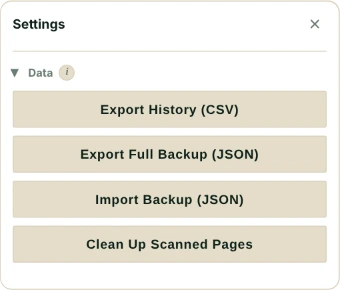
Settings → Data → Export History (CSV) gives you the tracked document’s last 14 tracked days, to open in Excel, Numbers or Google Sheets.
One row per day, in four columns: Date, Total Word Count, Edited Word Count and Counted Toward Streak. The file is called falcontext-history and the date, and Excel opens it with every character right. No document open? It asks you to open a tracked one first.
Back up everything
Export Full Backup (JSON) saves every tracked document’s goals, history, streaks and records, plus your settings, manuscripts, badges and best sprint, to one file: falcontext-backup and the date.
Not your license key or your plan, and not a sprint that’s running. No text from your pages either: only names (of documents, manuscripts, chapters and characters) and the few words of any finding you chose to ignore.
Bring a backup back
Import Backup (JSON) checks the file first, tells you how many documents are in it, and asks before it goes ahead. Then Falcontext reloads.
Days a document is missing come back, and so do manuscripts that are only in the backup. Nothing you have now is deleted, and a document’s current goals and records stay. Your settings, though (theme, layout, reminders and the like), go back to how they were in the backup.
In the desktop app, you pick where each file is saved.
Why it’s there
Because it’s your data. You should be able to take it with you.
- Plan
- Free No sign-up, no time limit.
Questions about exporting your writing history.
Can I export my writing history?
Yes. Export History (CSV) gives you the last 14 tracked days of the document you’re tracking, and Export Full Backup (JSON) saves everything to a file you can import again later. Both are free.
Does importing a backup overwrite my data?
Only your settings. Importing brings back the days and manuscripts in the backup and never deletes anything you have now, but your settings go back to how they were in the backup.
Related
Your next chapter starts today.
Set a goal, open your draft and let the checks look over your shoulder.
Add to Chrome – it's freeOr get the desktop app or Perch, the web app.
Free forever plan · No sign-up · Pro from $1.99/month with a free trial