Help › Chapters and scenes Free
Chapters & scenesHow your chapters get found.
You don’t have to tell Falcontext where your chapters and scenes are. Most of the time it finds them. Here’s what it looks for.
Chapters
Falcontext picks chapter titles up from:
- headings, as long as the style comes back: used at least twice, and once after the text has started. So a title page doesn’t count.
- larger title lines (at least a quarter bigger than your text), or bold centred lines of 10 words or fewer
- lines like “Chapter 3”, “Chapter Three”, “Chapter IV: The Storm” or “Part Two”, in English, Dutch, German, French, Spanish and Italian. Ten words at most, and it needs the number: “Part of me wanted to stay” stays a sentence.
- Prologue, Epilogue and Interlude, with or without a title
Text before your first chapter becomes a chapter of its own, “Opening”, if it’s at least 50 words.
Scenes within chapters
Scene breaks come from dividers and symbol lines of up to 20 characters, like ***, # # #, ❖ or ⁂. A line of dialogue with no letters in it, like “?”, doesn’t count. In the desktop app, use a symbol line: it doesn’t read dividers.
A break right where a chapter starts only separates the chapters. The heading level just below your chapters becomes the scene level, if it comes back too. Scenes that start at a break get a number (Chapter 3 – Scene 2); scene headings keep their own titles.
In Scrivener, each folder or document in the Draft is a heading at its own depth: a chapter folder, and the scenes inside it.
If it gets your chapters and scenes wrong
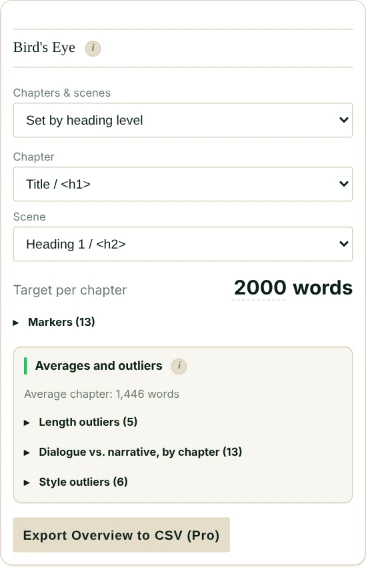
If it finds nothing, Falcontext uses your heading-level settings instead. You can set those yourself in Bird’s Eye: switch from Detect automatically to Set by heading level, and pick which level is a chapter and which a scene. For scenes you can also type a text or symbol of your own (up to 20 characters); then dividers count as breaks too.
Bird’s Eye scans again quietly while you write, and never replaces markers you added by hand.
Writing in Atticus? Falcontext uses your book’s own chapters and scene breaks.
- Plan
- Free No sign-up, no time limit.
Questions about chapters and scenes.
Why didn’t Falcontext find my chapters?
It looks for headings, larger or bold centred title lines, and lines like “Chapter 3”. If your chapters start some other way, set the heading levels yourself in Bird’s Eye.
How do I mark a scene break?
With a divider or a symbol line, like *** or ❖, or a scene heading. Each one starts the next scene.
Related
Related checks
Your next chapter starts today.
Set a goal, open your draft and let the checks look over your shoulder.
Add to Chrome – it's freeOr get the desktop app or Perch, the web app.
Free forever plan · No sign-up · Pro from $1.99/month with a free trial