Prose checks › Pacing per chapter Pro
Prose check: pacing per chapterThe chapter that changes gear.
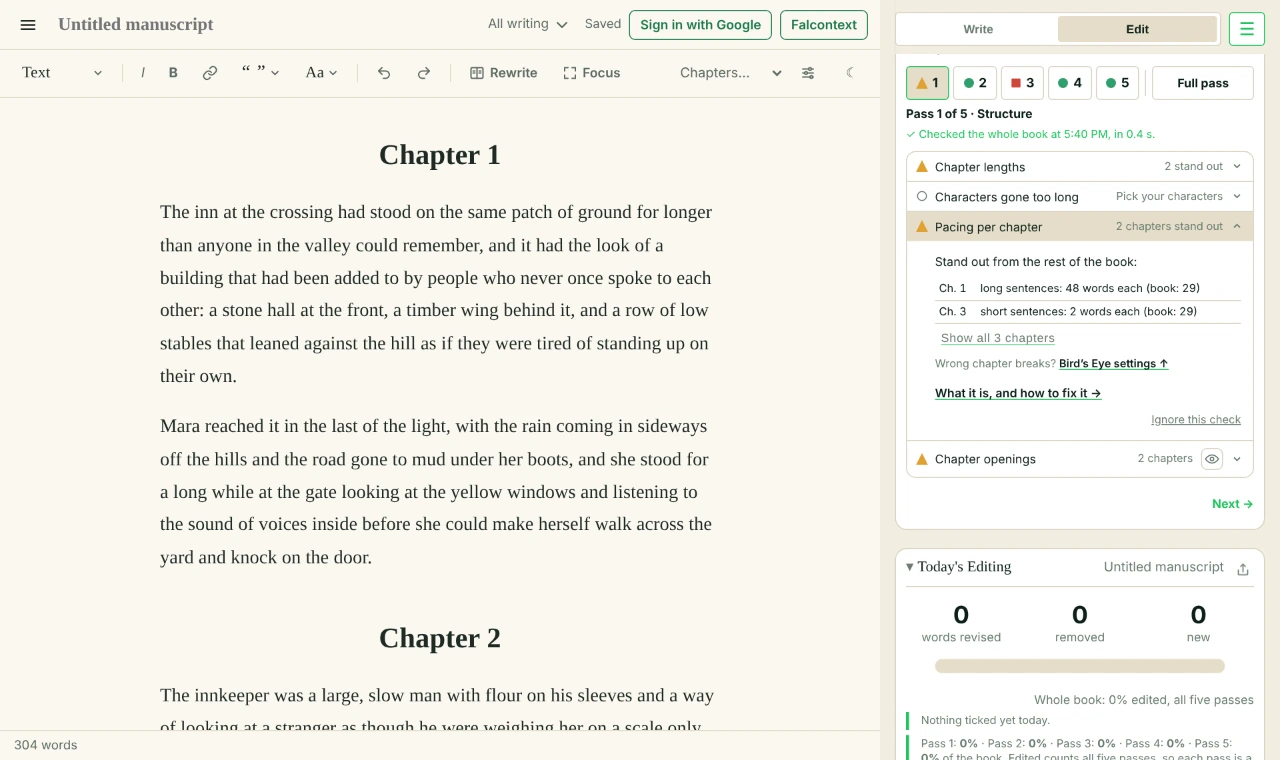
A chase scene reads faster than a funeral. Falcontext checks the pacing per chapter: it compares your chapters with each other and points out the ones whose pace stands out from the rest.

What pacing per chapter compares
Two things that change how fast a chapter reads:
- Sentence length. Short sentences speed things up.
- Dialogue. Talk moves faster than description.
A chapter that differs a lot from the rest of your book on either one is flagged.
The check lists only the chapters that stand out, each with why, in its own numbers against the book’s: “much more dialogue: 70% (book: 35%)”. Show all chapters opens the full table: words, sentence length and dialogue for every chapter. A “chapter” under 50 words, such as a stray heading, is left out of the comparison.
Stand out on purpose?
Often, yes. The fight, the escape, the quiet chapter after. Then it’s good to see that it’s working.
But a chapter in the middle of the book that crawls without you meaning it to? That’s the one to look at.
How Falcontext checks pacing per chapter
Guidelines, not rules. A chapter standing out is often the point. This makes sure you know which ones do.
- Finds
- Chapters whose sentence length or share of dialogue differs a lot from the rest of the book.
- Traffic light
- No chapter stands out
- 1–2
- 3 or more
It needs your chapters, so it runs after a Bird’s Eye scan.
Pacing per chapter comes first in the self-editing guide. Changes in the structure pass move whole scenes, so you make them before anything else.
Which of your chapters do you think would stand out?
Questions about pacing per chapter.
How do I check the pacing of my novel?
Falcontext compares each chapter’s sentence length and amount of dialogue with the rest of your book, and shows the chapters that stand out.
Does it need chapter headings?
It needs Bird’s Eye to have found your chapters, from headings, “Chapter 3” lines or the heading levels you choose.
Related checks
In Falcontext
Your next chapter starts today.
Set a goal, open your draft and let the checks look over your shoulder.
Add to Chrome – it's freeOr get the desktop app or Perch, the web app.
Free forever plan · No sign-up · Pro from $1.99/month with a free trial