Help › Editing passes Free
Chapters, scenes and passesEdit your book one pass at a time.
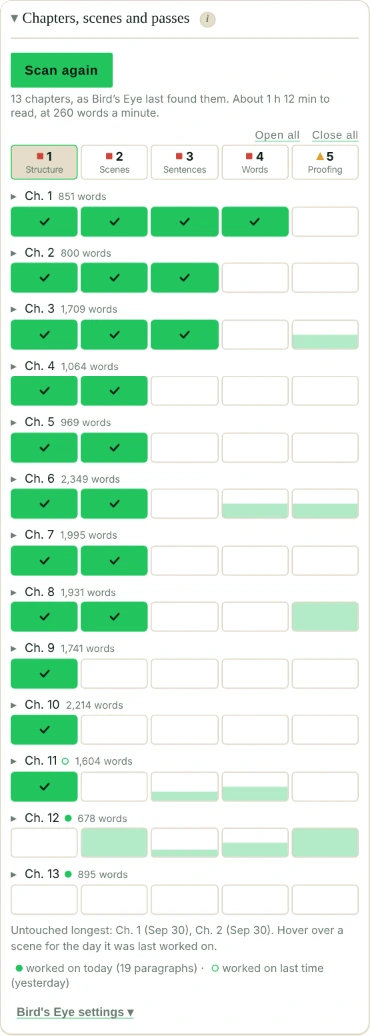
Editing a whole novel at once is a lot. The Edit tab splits it into five editing passes, big to small, and lets you tick each scene as a pass is done.
The five editing passes
- Structure (by chapter): pacing per chapter, chapter openings, chapter lengths, and characters gone too long.
- Scenes and dialogue: tense and point of view, head hopping, dialogue tags, dialogue and narrative, monologues, stage directions, continuity slips and the five senses.
- Sentences: passive voice, sentence openers (repetitive and “-ing” openers), sentence rhythm, paragraph length, readability and punctuation habits.
- Words: adverbs, filter words, clichés, repeated words, telling emotions, crutch words, weak constructions, uncommon words, and dated or hurtful words (off until you turn it on).
- Proofing: spelling consistency (US and UK spelling, words written two ways), name spelling slips, punctuation consistency (dialogue quotes, curly quotes, dashes, ellipses), spacing, unfinished sentences, doubled words and paragraphs, homophones, Chicago style and dialogue punctuation.
Each pass has its own checks. Big problems first, typos last. No point polishing a sentence in a scene you’re about to cut.
A pass can check one scene, a chapter or the whole book. Passes 2 to 5 can also check only today’s writing, or your changes since last time. Or run a Full pass: every check, on the whole book.
Done with a full pass? Click Done: record this full pass. Falcontext keeps the day, your word count and each check’s light. The next time you open Full pass, it compares with that one: how many checks got better, how many worse, and which, so you can see whether the editing is working. The Edit tab shows your last full pass, and what changed since the one before.
Next up points you to the first scene still to tick, in the first pass that isn’t done.
Ticking scenes
Tick a scene when a pass is done on it, or a chapter’s box to do all its scenes. Structure goes by chapter.
A box fills up as you fix or ignore what its checks found. Once they’re all green, it ticks itself, in passes 2 to 5. You can turn that off in Settings. It never ticks a box again that you unticked, and these ticks don’t count towards your editing streak.
Edited shows how much of the book is through each pass. Each pass is a fifth of it, so all five passes is 100%.
Move things around
A scene keeps its ticks by its heading or its first words, not its number. So adding or moving scenes keeps them.
And if a ticked scene changes a lot (a paragraph added or cut, or several rewritten), it gets a ✎, with Untick or Keep. A tick never unticks by itself.
- Plan
- Free Pro adds each chapter compared with your average: dialogue, adverbs and passive voice per chapter.
Questions about editing passes.
What are the five editing passes?
Structure, scenes and dialogue, sentences, words, and proofing: from the shape of the book down to typos. Each has its own checks, and you tick each scene as a pass is done.
Do my ticks survive if I move a scene?
Yes. A scene keeps its ticks by its heading or its first words, not its position, so adding or moving scenes keeps them.
Related
Related checks
Your next chapter starts today.
Set a goal, open your draft and let the checks look over your shoulder.
Add to Chrome – it's freeOr get the desktop app or Perch, the web app.
Free forever plan · No sign-up · Pro from $1.99/month with a free trial