Help › Slips as you write Free
Slips as you writeCatch the typos while you’re still drafting.
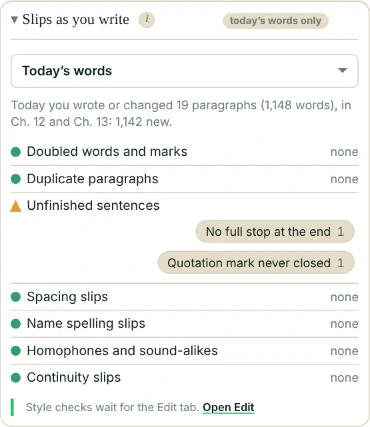
While you draft, the Write tab shows only the slips, in what you’ve written or changed today. Style advice can wait for the Edit tab.
What counts as a slip
The things that are just wrong, not a matter of style:
- doubled words (“the the”)
- paragraphs pasted twice
- unfinished sentences (no full stop, a quotation mark never closed)
- spacing slips
- and with Pro, homophones and name spelling slips (“Rena” among the “Reina”s)
Slips as you write, in today’s words only
It checks what you’ve written or changed today, wherever it is in the document, every few seconds as you write. Or, with the Since last time menu, since the start of the last day you worked on it. The menu shows once there is such a day, and names it: “Since yesterday”.
How it knows what’s today’s: Falcontext keeps a short code for each paragraph on your device, never its words. A paragraph that’s new or changed since the day’s first reading is today’s. A document that started the day empty is all today’s. With Drive sync on, it knows what you changed on another computer too.
So you’re not looking at last month’s chapter while you write this one.
Each check is a row: a green dot with “none”, or an orange one with the slips it found most, each with a count. Click one to see it in your text. Above the rows, a line sums up today: how many paragraphs you wrote or changed, in which scenes, and how many words are revised, removed and new.
Slips as you write, after a sprint or your goal
When a sprint ends, the result tells you the slips in what you just wrote, or that there are none. Reach your daily goal, and the message adds a quick look at today’s slips, with Show the slips.
Why not the style checks too?
Because drafting and editing are different jobs. Adverbs and filter words can wait. The prose checks are on the Edit tab when you’re ready.
- Plan
- Free Doubled words, duplicate paragraphs, unfinished sentences and spacing. Homophones, name spelling slips and continuity slips are in Pro; on the free plan each says how many it found today.
Questions about slips as you write.
What does Falcontext check while I write?
Only the slips, in what you’ve written or changed today: doubled words, paragraphs pasted twice, unfinished sentences and spacing slips, and with Pro, homophones and name spelling slips.
Where are the other checks?
On the Edit tab: all the checks, in five passes. The Write tab keeps to the slips so you can keep drafting.
Related
Related checks
Your next chapter starts today.
Set a goal, open your draft and let the checks look over your shoulder.
Add to Chrome – it's freeOr get the desktop app or Perch, the web app.
Free forever plan · No sign-up · Pro from $1.99/month with a free trial