Help › Trend graph Pro
Trend graphSeven days. One look.
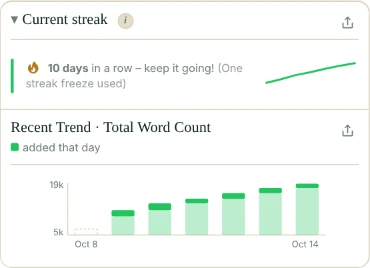
The trend graph shows how your word count grew over the last seven days, so you can see your writing pace at a glance.
What the trend graph shows
It sits in the Current streak card: Recent Trend · Total Word Count. One bar for each of the last seven days. The whole bar is that day’s total; the solid top is what you added since the day before.
- A day you didn’t open Falcontext is an empty, dashed slot. Words from then show up in the next bar.
- Hover over a day to see its total and the words added that day.
- The scale starts just below your lowest total, not at zero, so a good day stands out on a long book too.
When the document belongs to a manuscript, the graph shows the whole book’s totals.
Getting it to fill up
It needs two days of tracking before it draws anything; until then it says to check back after a few sessions. Falcontext keeps 14 days of history per document, the same window the finish date uses.
On a share card
With Pro, you can put the graph on the picture you share: tick Trend graph in the Share panel. More about sharing.
Turning it off
Don’t want it? Settings → Tracking → untick Trend graph.
- Plan
- Pro Part of Pro ($1.99/month or $19.99/year, with a free trial). On the free plan, it shows blurred.
Questions about the trend graph.
How many days does the trend graph show?
The last seven calendar days. A day Falcontext didn’t see stays empty, and its words show up in the next bar.
Is the trend graph free?
No, it’s part of Pro. Free users see it blurred, with a link to unlock it.
Related
Your next chapter starts today.
Set a goal, open your draft and let the checks look over your shoulder.
Add to Chrome – it's freeOr get the desktop app or Perch, the web app.
Free forever plan · No sign-up · Pro from $1.99/month with a free trial