Help › Sharing Free
SharingWrote a lot today? Show it.
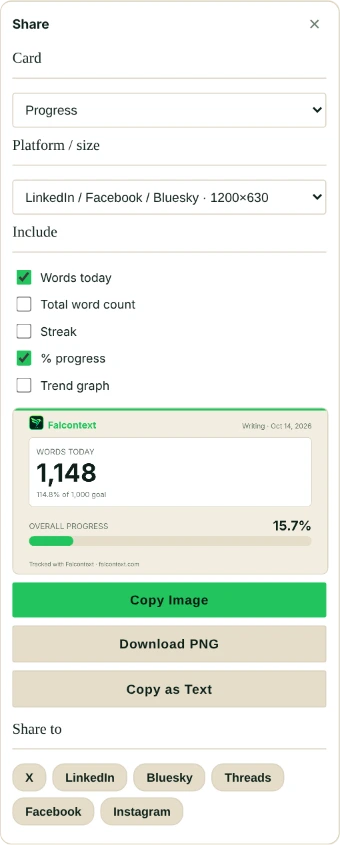
Share your writing progress without a screenshot: Falcontext draws a card with your numbers, right on your device, sized for where you’re posting.
What you can share
- Your progress: words today, your total, your streak and how far along your book is. Pick what goes on it.
- A personal record: your best writing day, best sprint, longest streak and more, with your previous best if you just beat it.
- A badge: any badge you’ve earned.
- With Pro: your trend graph of the last seven days.
Click the share icon on a card, a record or a badge, or Share it when a new record or badge comes up.
Making the card
In the Share panel, pick a size: LinkedIn, Facebook and Bluesky; X; an Instagram or Threads post (square or 4:5); or Stories, Reels and TikTok. The preview changes as you go, in the colours of your Falcontext theme.
Then Copy Image, Download PNG or Copy as Text. Or click X, LinkedIn, Bluesky, Threads, Facebook or Instagram under Share to: Falcontext copies the picture (or downloads it), opens the site, and fills in the text where the site allows. You paste the picture and post it yourself; nothing is posted for you.
Private by design
The picture is drawn in your browser or the desktop app, nothing uploaded. Only the numbers you ticked go on it. Your document’s name never does.
- Plan
- Free No sign-up, no time limit. The trend graph on a card is Pro.
Questions about share cards.
Is my document’s name on the share card?
No. Only the numbers you pick go on it, never the name or address of your document.
Does Falcontext post for me?
No. It copies or downloads the picture and opens the site you chose; you paste it and post it yourself.
Related
Your next chapter starts today.
Set a goal, open your draft and let the checks look over your shoulder.
Add to Chrome – it's freeOr get the desktop app or Perch, the web app.
Free forever plan · No sign-up · Pro from $1.99/month with a free trial