Help › Getting started Free
Getting startedThree steps, then write.
Add Falcontext, open your draft, give yourself a goal. From then on it counts every word you add, with nothing to log and no account to make.
1. Pick where you write
Falcontext comes three ways, with the same goals, streaks and checks in each:
- The browser extension for Google Docs, Atticus, WordPress, Ellipsus and other web editors, in Chrome, Edge, Brave, Arc and Firefox.
- The desktop app for Scrivener, Word and LibreOffice Writer on Mac and Windows, and Pages on the Mac.
- Falcontext Perch, the web app, on a phone, tablet or any computer: it counts your Google Docs and has a writing pad of its own.
Not sure? Every editor Falcontext works with, and what each one gets.
2. Open your draft and click the falcon
With the extension, pin it first: click the puzzle-piece icon (Extensions) at the top right of your browser, then the pin next to Falcontext. In Microsoft Edge, click Show in toolbar (the eye icon) instead.
Then open what you’re writing and click the falcon icon. Falcontext opens beside your draft and counts it.
In Google Docs, the first time, Google asks you to sign in, and a small window asks you to allow this document. That’s Google’s own file picker: Falcontext can only ever read the documents you pick there, and nothing else in your Drive.
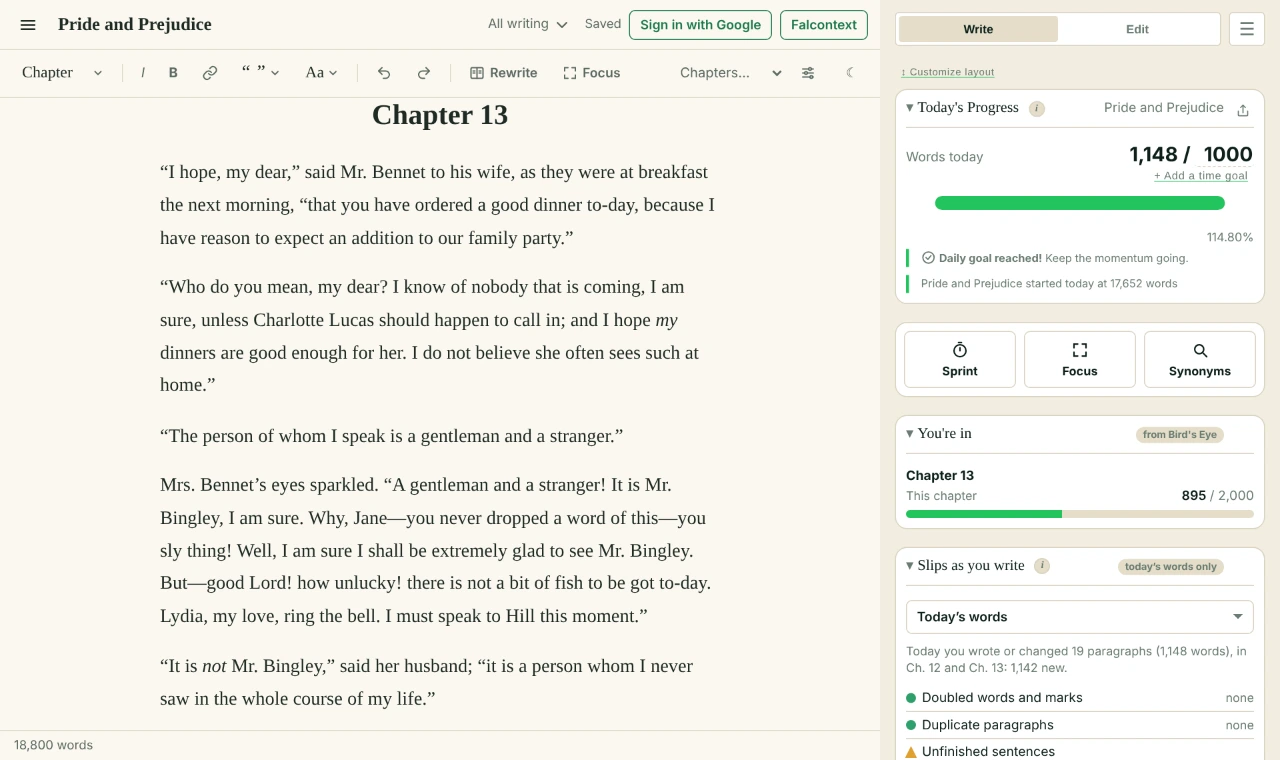
3. Set your goal
Click the numbers after the slash in the panel: your daily goal (1,000 to start with) and your total goal for the book (80,000). Type your own. From then on, every day you write adds to your streak, and the finish date follows your pace. More in Goals and progress.
Then, when you like
- Run a sprint: a timer for your word count.
- Open the Edit tab for Bird’s Eye, your chapters and scenes, and the prose checks.
- Writing on several computers or browsers? Sync keeps your streak and history in step.
- Bought Pro or Ad-Free? Paste your license key.
- Plan
- Free No sign-up and no time limit.
Questions about getting started.
Do I need an account?
No. Falcontext needs no sign-up. In Google Docs, Google asks you to sign in to Google, so Falcontext can read the documents you allow.
Does Falcontext read the rest of my Google Drive?
No. It can only read the Google Docs you pick in Google’s own file picker, and your writing is never sent anywhere.
I write in Scrivener or Word. Which one do I need?
The desktop app, for Mac and Windows. It tracks Scrivener, Word and LibreOffice Writer, and Pages on the Mac.
Related
Your next chapter starts today.
Set a goal, open your draft and let the checks look over your shoulder.
Add to Chrome – it's freeOr get the desktop app or Perch, the web app.
Free forever plan · No sign-up · Pro from $1.99/month with a free trial