Help › Writing days Free
Writing daysWhat did I write on Tuesday?
Which scenes grew on which day, and what changed since: added, cut, moved.
The calendar
The Edit tab’s Writing days shows five weeks, Monday first. A day your scenes grew is green, darker for more words. Click a day for the scenes you wrote that day, and how many new words each got.
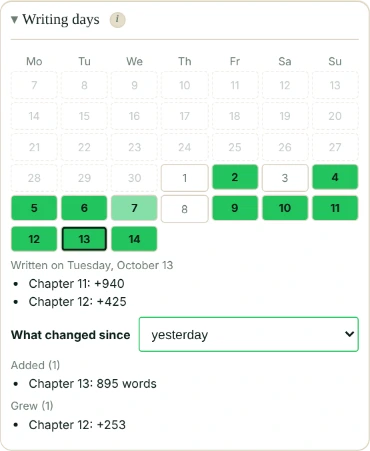
What changed since
Pick yesterday, a week, two weeks, a month, or the first day kept, and see what changed since then: scenes added, cut, that grew or shrank, and the ones that moved (only those that really moved, not every scene after them).
What’s kept, and where
Each day, Falcontext keeps the list of your scenes on this device: for each, a short code, its heading or first words, and its word count. Never your text, and it’s never synced. The latest 400 days are kept.
- Plan
- Free No sign-up, no time limit.
- Works in
- Falcontext 6.0 and later: the browser extension, the desktop app and Falcontext Perch.
- Kept
- On this device only, never synced.
Questions about writing days.
Why doesn’t my other computer show the same days?
The days are kept on the device they were written on, and never synced: each device has its own.
Is my text kept or sent anywhere?
No: scene headings or first words and word counts only. Your writing is never sent anywhere, and no AI is used on your writing in any way.
Related
Your next chapter starts today.
Set a goal, open your draft and let the checks look over your shoulder.
Open Falcontext PerchOr get the desktop app or the browser extension.
Free forever plan · No sign-up · Pro from $1.99/month with a free trial