Help › Notes to self Free
Notes to selfEverything you meant to come back to.
The notes you left in your text and your document’s open comments, in one list, chapter by chapter.
Notes in your text
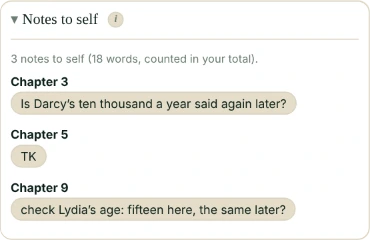
Write [[check her age]] on one line, or TK (TKTK and [TK] too), anywhere in your draft. The Edit tab’s Notes to self lists them all in reading order, by chapter and scene. Click one to see it in your text. Notes in your text still count as words, and the list says how many.
Comments
Your document’s open comments are listed with them (not the resolved ones): an editor’s or a beta reader’s too. Comments sit beside the text, so they never count as words.
- Google Docs: read with the access Falcontext already has, no new “allow” screen.
- WordPress: the block editor’s Notes (WordPress 6.9 and later).
- Word, LibreOffice and Scrivener: in the desktop app.
Before a download
In Perch’s writing pad, downloading a manuscript with notes still in it asks first: “3 notes to self still in this manuscript ([[check her age]], TK, …). Download anyway?” Comments never go into a download.
- Plan
- Free No sign-up, no time limit.
- Works in
- Falcontext 6.0 and later: the browser extension, the desktop app and Falcontext Perch.
- Kept
- Nothing new: the notes are in your text, the comments in your document.
Questions about notes to self.
Are my comments sent anywhere?
No. They’re read on your device, like your text. Your writing is never sent anywhere, and no AI is used on your writing in any way.
Do notes count towards my word count?
Notes in your text do, as any words do; the list says how many. Comments never do.
Related
Your next chapter starts today.
Set a goal, open your draft and let the checks look over your shoulder.
Open Falcontext PerchOr get the desktop app or the browser extension.
Free forever plan · No sign-up · Pro from $1.99/month with a free trial