Help › Your plan Pro
Your planPlan it, write it, see where they part.
Plan your scenes before you write them (or only some of them), then see where the book keeps to the plan and where it doesn’t.
Scene cards
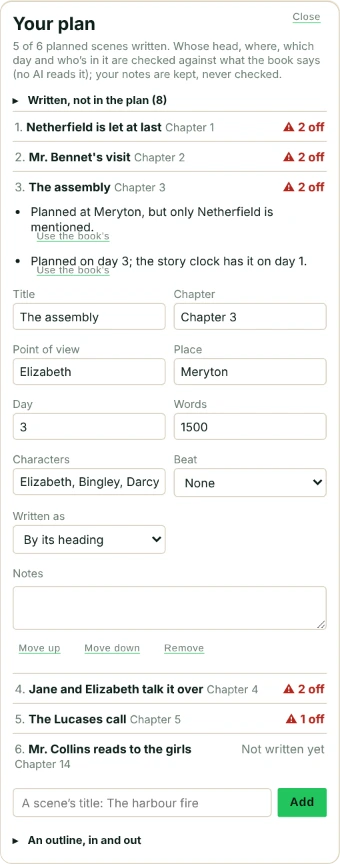
On the Edit tab, Open the plan. Each planned scene is a card: a title (the only thing you have to fill in), and if you like its chapter, point of view, place, day, length, characters, the beat of your story structure and notes. Move a card up or down, or remove it. Escape or Close takes you back.
Your plan against your book
A written scene is matched to a planned one by hand (Written as), by the same heading, or, in a chapter of one scene, by the chapter’s name. Never by order. Then Falcontext says where the book went its own way:
- “Planned in Tom’s head, but it reads as Mara’s”
- “Planned at the harbour, but only Crown is mentioned”
- “Planned on day 3; the story clock has it on day 5”
- “Jonah is planned in it but never named”
- a scene written at more than half again its planned length, or a beat that lands away from where the structure puts it.
Where the book is right and the plan isn’t, Use the book’s. Scenes you wrote that aren’t in the plan are listed too, with Add to the plan.
An outline in and out
Download the outline saves your plan as a text file, a label a line (Scene:, POV:, Place:, Day:, Beat:, Characters:, Words:). Paste one in that shape, or pick the file, and Load this outline: it says what it read, and which lines it didn’t. A scene with the same title is updated, not added twice.
- Plan
- Pro Part of Pro ($1.99/month or $19.99/year, with a free trial).
- Works in
- Falcontext 6.0 and later: the browser extension, the desktop app and Falcontext Perch.
- Kept
- With the document, and on your other devices with Drive sync.
Questions about your plan.
Do I have to plan every scene?
No. Plan as many or as few as you like: scenes you wrote without a plan are simply listed as not in the plan.
Does Falcontext check my notes on a card?
No. Notes are for you; they’re shown, never checked.
Related
Your next chapter starts today.
Set a goal, open your draft and let the checks look over your shoulder.
Open Falcontext PerchOr get the desktop app or the browser extension.
Free forever plan · No sign-up · Pro from $1.99/month with a free trial