Falcontext › Writing analysis
Writing analysisYour whole book, checked big to small.
Falcontext is a writing analysis tool for a whole manuscript: five passes, from the shape of the book down to a stray space. Each check is measured against published fiction, and it all runs on your own device, without AI.
On a phone or tablet? Falcontext Perch, the web app, works in any browser.
Pro shows every finding. Try Pro for free →
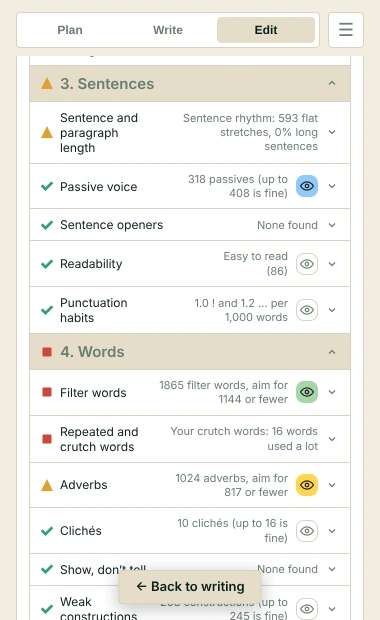
How the writing analysis tool works: five passes
The Edit tab splits the work into five editing passes: big problems first, typos last. No point polishing a sentence in a scene you’re about to cut.
- Structure, by chapter: pacing per chapter, chapter openings, chapter lengths and characters gone too long.
- Scenes and dialogue: tense and point of view, head hopping, dialogue tags, dialogue against narrative, monologues, stage directions, continuity slips and the five senses.
- Sentences: passive voice, sentence openers, sentence rhythm, paragraph length, readability and punctuation habits.
- Words: adverbs, filter words, clichés, repeated and crutch words, telling emotions, weak constructions and uncommon words.
- Proofing: US and UK spelling, words written two ways, name spelling slips, quotes, dashes and ellipses, spacing, doubled words and paragraphs, sound-alikes and dialogue punctuation.
A pass can check one scene, a chapter or the whole book. A full pass runs every check on the whole book, and the next one tells you which checks got better and which got worse. Every check, with examples.
Measured against published fiction
Each check gets a green tick, an orange triangle or a red square. Green is what most published novels do. Orange is still within what published novels do. Red is beyond nearly all of them.
Those lines come from Google Books’ English Fiction, 2000–2019, and my own count across 109 published books. How the icons are set. They’re guidelines, not rules: what stays is up to you.
Bird’s Eye: the book from above
Bird’s Eye finds every chapter and scene, with its length and reading time, and shows who appears where. With Pro it adds pacing, the book’s shape and how much of each chapter is dialogue.
What it doesn’t do
No AI reads your book, so nothing rewrites your sentences. And it isn’t a full spelling or grammar checker, so keep your editor’s own on. What it checks without AI.
Where it works
In Google Docs, Atticus, WordPress and Ellipsus through the browser extension; in Word, Scrivener, Pages, LibreOffice Writer, OpenOffice and Vellum through the desktop app; and in Perch’s writing pad. Fix puts a finding’s fix into your text in all of them (OpenOffice on Windows).
Not sure where to start? The self-editing guide says what to do in each pass.
Questions about writing analysis
How long does it take to analyse a whole book?
Seconds. Every check is a rule or a word list that runs on your own device.
Which checks are free?
Adverbs, passive voice, tense and point of view, dialogue tags, filter words, doubled words, spacing, unfinished sentences and duplicate paragraphs are free in full. The others show their icon and how much they found; Pro shows every finding.
Is my manuscript sent anywhere?
No. Your writing is never sent anywhere, and no AI is used on your writing in any way.
Related
Analyse your own draft
Open a chapter, or the whole book, and see what it finds.
Add to Chrome – it’s freeOr get the desktop app or Perch, the web app.
Free forever plan · No sign-up · Pro $19.99 a year, with a 14-day free trial