Falcontext › Guides › Writing sprints
Writing sprintsSprint together, wherever you are.
Writing sprints online: start one, share its link, and everyone writes at the same moment. Falcontext counts each writer’s own words. Free, and on Discord too.
On a phone or tablet? Falcontext Perch, the web app, works in any browser.
What is a writing sprint?
A set stretch of time, often 15 to 30 minutes, where you only write: no editing, no checking your phone. At the end you see how many words you added.
Writing sprints with others
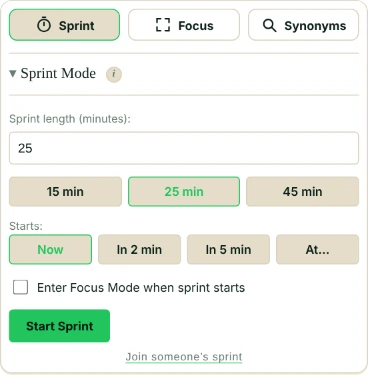
- Open Sprint in Falcontext’s Write tab. Under Starts, pick In 2 min, In 5 min or a time.
- Copy a link and paste it in your group’s chat.
- Each writer pastes it under Join someone’s sprint. Everyone starts and ends at the same moment.
- At the end, Copy my result gives “642 words in 20 minutes” to paste back.

It works in the browser extension, the desktop app and Perch. The link holds only the start time and length.
Writing sprints on Discord
Add Falcontext’s bot to your server, then type /sprint 20, /sprint 20 at 5pm or /sprint 20 people:4 (it starts once four have joined). Writers click Join; the bot pings them as it starts and when time’s up. /sprint help lists the rest.
A sprint on your own
Pick 1 to 180 minutes, with 15, 25 and 45 one click away, and write. Your best sprint counts towards your personal records. How the sprint timer works.
Your writing is never sent anywhere, and no AI is used on your writing in any way.
Questions about writing sprints
How long should a writing sprint be?
Often 15 to 30 minutes. In Falcontext, anything from 1 to 180.
Are the sprints free?
Yes, alone or with others, with no sign-up.
Does a sprint work in Google Docs?
Yes, and in Scrivener, Word and the other editors Falcontext tracks.
Related
Start a sprint
Set a timer, share the link, and write.
Add to Chrome – it’s freeOr get the desktop app or Perch, the web app.
Free forever plan · No sign-up · Pro $19.99 a year, with a 14-day free trial